

Tra il replay e i commenti su punti di forza e aree di miglioramento, non temo più di aiutare i miei ragazzi con la scrittura!

STRUMENTI AI PER VALUTARE E CORREGGERE LA SCRITTURA
Semplifica la valutazione della scrittura con gli strumenti AI di Brisk per analizzare, correggere e valutare il lavoro degli studenti.
01
Visualize a student's writing process
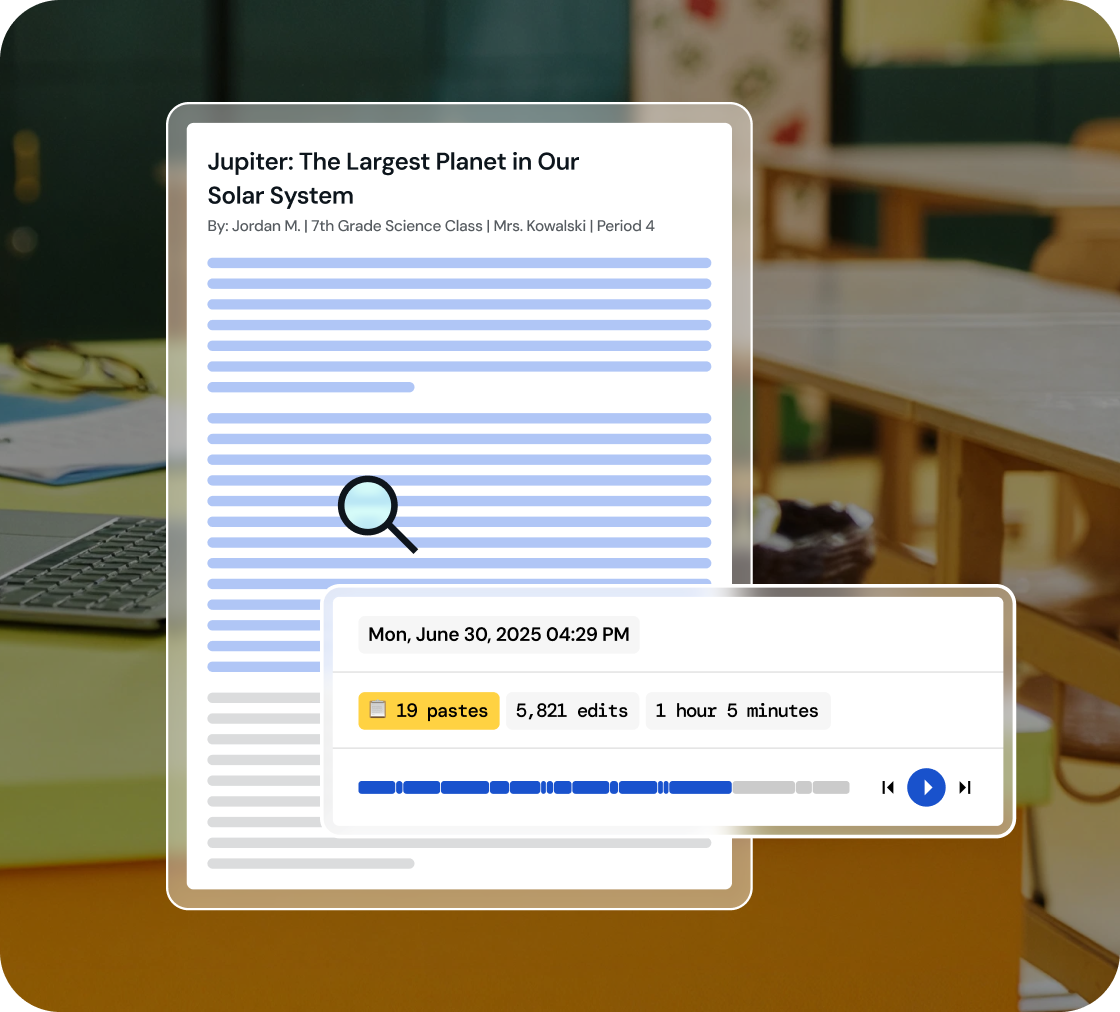
Dive into a replay of student work creation and effortlessly playback their revision journey, all within a comprehensive view.
02
Identify key writing milestones
Understand how student writing develops. Watch every stage of their process, from initial drafting and copy/pastes to the final adjustments.
03
Foster integrity in learning
Use 'Inspect Writing' to start discussions on academic honesty and nurture a culture of integrity in your classroom.
Inspect drafts, revisions, and final work
‘Inspect Writing’ shows a video-style replay of a student’s writing process from first draft to final version. See what they added, deleted, or pasted in, and how they responded to feedback. Brisk helps teachers track real-time growth and spot exactly where support is needed.
.svg)
Get a closer look at student writing practices
Through a video replay, track how students develop their writing - from copied content to sentence construction to post-feedback edits. Brisk gives teachers insight into each step of the process, making it easier to spot learning gaps and guide growth.
.png)
Engage in conversations on academic honesty
Use 'Inspect Writing' to start meaningful conversations about academic honesty in the classroom. Inspect Writing helps teachers build a culture of integrity and responsibility, making it easier to support honest academic behavior.
.png)

Alleggerisci la tua giornata con Brisk
Grazie! La tua richiesta è stata ricevuta!
Ops! Qualcosa è andato storto durante l'invio del modulo.
Domande frequenti
Come dovrei usare Inspect Writing con gli studenti?
Brisk propone Inspect Writing come uno strumento per avviare un dialogo. Se la riproduzione della scrittura di uno studente solleva dubbi, consigliamo di cogliere l'occasione per avviare una conversazione sull'integrità accademica e sulla paternità del testo.
Inspect Writing funziona con Google Docs?
Sì. Lo strumento Inspect Writing di Brisk funziona direttamente all'interno di Google Docs tramite l'estensione Chrome di Brisk. Gli studenti scrivono su Docs come farebbero normalmente e Brisk ne registra il processo.
Lo strumento di analisi della scrittura di Brisk è accurato?
Brisk non fornisce un punteggio di accuratezza. Mostra invece una cronologia fattuale di come è stato prodotto il documento.
Brisk rileva i testi generati dall'IA?
Sì. Puoi creare e modificare le risorse Brisk all'interno di Word, PowerPoint e OneDrive.
Yes. Brisk helps teachers understand how students wrote, not just what they turned in, which is essential for supporting academic integrity and authentic learning.
With Brisk’s Inspect Writing tool, you can watch a video-style replay of a student’s full writing process in Google Docs, from first steps to final draft. You’ll see:
- When students wrote, including timestamps and how long the work took
- What they typed, edited, added, or deleted
- Where text may have been pasted in
- How they responded to feedback and revision prompts
This helps teachers verify authentic work, understand each student’s thinking, and pinpoint exactly where support or instruction is needed.