

Nhờ tính năng xem lại cùng những nhận xét khích lệ, tôi không còn thấy sợ mỗi khi phải hỗ trợ các con hoàn thành bài viết nữa!

CÔNG CỤ AI ĐỂ ĐÁNH GIÁ VÀ CHẤM ĐIỂM BÀI VIẾT
Đơn giản hóa việc đánh giá bài viết với các công cụ AI của Brisk để kiểm tra, chấm điểm và đánh giá bài làm của học sinh.
01
Visualize a student's writing process
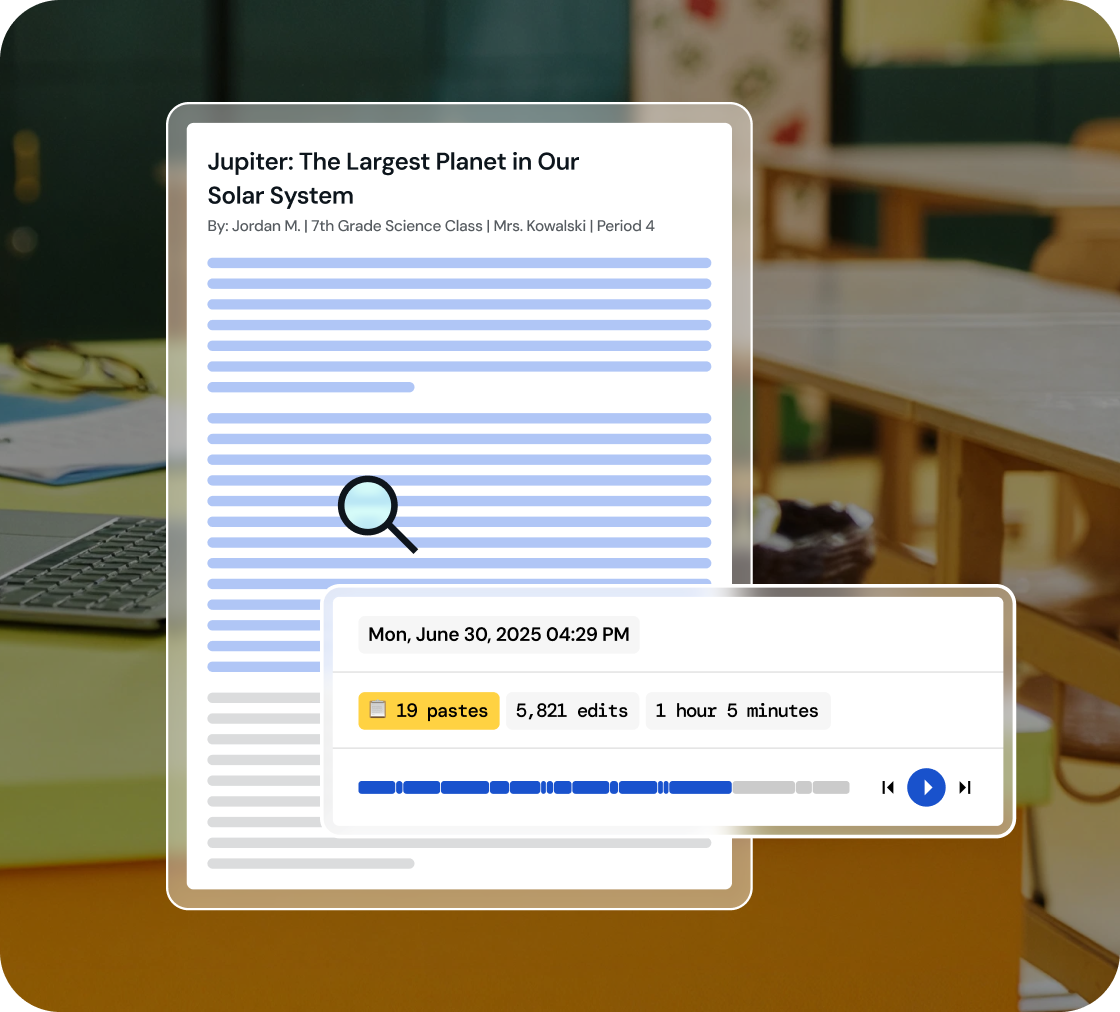
Dive into a replay of student work creation and effortlessly playback their revision journey, all within a comprehensive view.
02
Identify key writing milestones
Understand how student writing develops. Watch every stage of their process, from initial drafting and copy/pastes to the final adjustments.
03
Foster integrity in learning
Use 'Inspect Writing' to start discussions on academic honesty and nurture a culture of integrity in your classroom.
Inspect drafts, revisions, and final work
‘Inspect Writing’ shows a video-style replay of a student’s writing process from first draft to final version. See what they added, deleted, or pasted in, and how they responded to feedback. Brisk helps teachers track real-time growth and spot exactly where support is needed.
.svg)
Get a closer look at student writing practices
Through a video replay, track how students develop their writing - from copied content to sentence construction to post-feedback edits. Brisk gives teachers insight into each step of the process, making it easier to spot learning gaps and guide growth.
.png)
Engage in conversations on academic honesty
Use 'Inspect Writing' to start meaningful conversations about academic honesty in the classroom. Inspect Writing helps teachers build a culture of integrity and responsibility, making it easier to support honest academic behavior.
.png)

Tận hưởng ngày mới nhẹ nhàng cùng Brisk
Cảm ơn bạn! Chúng tôi đã nhận được thông tin gửi đi!
Rất tiếc! Đã xảy ra lỗi khi gửi biểu mẫu.
Các câu hỏi thường gặp
Tôi nên sử dụng Inspect Writing với học sinh như thế nào?
Brisk định hướng Inspect Writing là một công cụ để bắt đầu các cuộc đối thoại. Nếu quá trình phát lại bài viết của học sinh gây ra nghi vấn, chúng tôi khuyên bạn nên tận dụng cơ hội này để bắt đầu một cuộc trò chuyện về tính trung thực trong học thuật và quyền tác giả.
Inspect Writing có hoạt động với Google Docs không?
Có. Công cụ Inspect Writing của Brisk hoạt động trực tiếp trong Google Docs thông qua tiện ích mở rộng Brisk trên Chrome. Học sinh chỉ cần viết bài trong Docs như bình thường, và Brisk sẽ ghi lại toàn bộ quá trình đó.
Công cụ kiểm tra bài viết của Brisk có chính xác không?
Brisk không đưa ra điểm số chính xác. Thay vào đó, công cụ này cung cấp cho bạn hồ sơ thực tế về quá trình tạo ra tài liệu đó.
Brisk có phát hiện được văn bản do AI tạo ra không?
Có. Bạn có thể tạo và chỉnh sửa các tài nguyên Brisk ngay trong Word, PowerPoint và OneDrive.
Yes. Brisk helps teachers understand how students wrote, not just what they turned in, which is essential for supporting academic integrity and authentic learning.
With Brisk’s Inspect Writing tool, you can watch a video-style replay of a student’s full writing process in Google Docs, from first steps to final draft. You’ll see:
- When students wrote, including timestamps and how long the work took
- What they typed, edited, added, or deleted
- Where text may have been pasted in
- How they responded to feedback and revision prompts
This helps teachers verify authentic work, understand each student’s thinking, and pinpoint exactly where support or instruction is needed.