

Entre la relecture vidéo et les commentaires constructifs, je n'appréhende plus d'aider mes élèves dans leur rédaction !

OUTILS IA POUR ÉVALUER ET NOTER LES ÉCRITS
Simplifiez l'évaluation des écrits avec les outils IA de Brisk pour analyser, noter et évaluer le travail des élèves.
01
Visualize a student's writing process
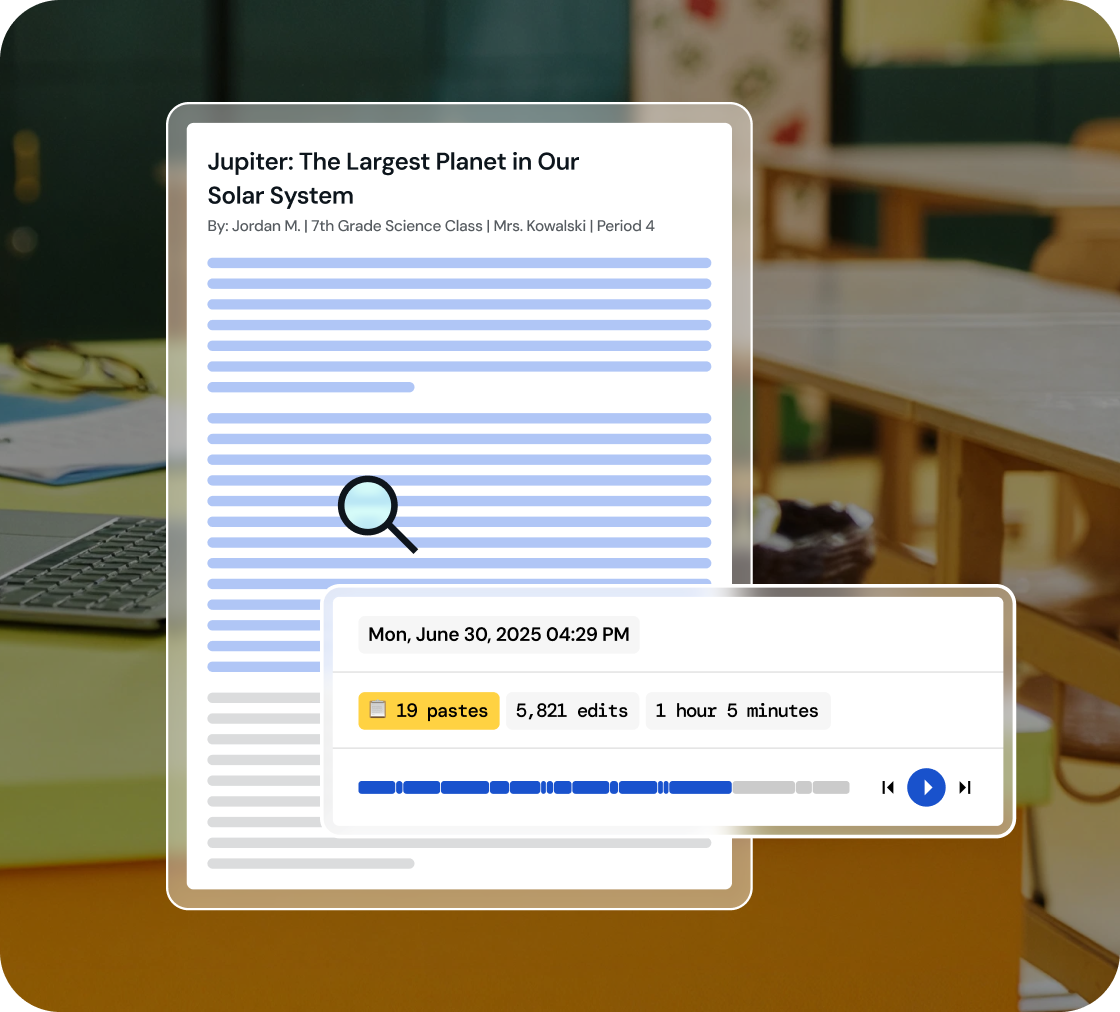
Dive into a replay of student work creation and effortlessly playback their revision journey, all within a comprehensive view.
02
Identify key writing milestones
Understand how student writing develops. Watch every stage of their process, from initial drafting and copy/pastes to the final adjustments.
03
Foster integrity in learning
Use 'Inspect Writing' to start discussions on academic honesty and nurture a culture of integrity in your classroom.
Inspect drafts, revisions, and final work
‘Inspect Writing’ shows a video-style replay of a student’s writing process from first draft to final version. See what they added, deleted, or pasted in, and how they responded to feedback. Brisk helps teachers track real-time growth and spot exactly where support is needed.
.svg)
Get a closer look at student writing practices
Through a video replay, track how students develop their writing - from copied content to sentence construction to post-feedback edits. Brisk gives teachers insight into each step of the process, making it easier to spot learning gaps and guide growth.
.png)
Engage in conversations on academic honesty
Use 'Inspect Writing' to start meaningful conversations about academic honesty in the classroom. Inspect Writing helps teachers build a culture of integrity and responsibility, making it easier to support honest academic behavior.
.png)

Allégez votre quotidien avec Brisk
Merci ! Votre demande a bien été reçue !
Oups ! Une erreur est survenue lors de l'envoi du formulaire.
Foire aux questions
Comment utiliser l'inspection de l'écriture avec mes élèves ?
Brisk conçoit l'inspection de l'écriture comme un outil pour engager le dialogue. Si la relecture du travail d'un élève soulève des questions, nous vous recommandons d'utiliser ce moment pour entamer une discussion sur l'intégrité académique et la paternité du texte.
L'inspection de l'écriture fonctionne-t-elle avec Google Docs ?
Oui. L'outil d'inspection de l'écriture de Brisk fonctionne directement dans Google Docs via l'extension Chrome Brisk. Les élèves rédigent dans Docs comme ils le font habituellement, et Brisk enregistre le processus.
L'outil d'inspection de l'écriture de Brisk est-il fiable ?
Brisk ne génère pas de score de précision. Il vous présente plutôt un historique factuel de la création du document.
Brisk détecte-t-il les textes générés par IA ?
Oui. Vous pouvez créer et modifier des ressources Brisk dans Word, PowerPoint et OneDrive.
Yes. Brisk helps teachers understand how students wrote, not just what they turned in, which is essential for supporting academic integrity and authentic learning.
With Brisk’s Inspect Writing tool, you can watch a video-style replay of a student’s full writing process in Google Docs, from first steps to final draft. You’ll see:
- When students wrote, including timestamps and how long the work took
- What they typed, edited, added, or deleted
- Where text may have been pasted in
- How they responded to feedback and revision prompts
This helps teachers verify authentic work, understand each student’s thinking, and pinpoint exactly where support or instruction is needed.