

Entre la repetición y los comentarios de refuerzo positivo, ¡ya no me da miedo ayudar a mis alumnos con su escritura!

HERRAMIENTAS DE IA PARA EVALUAR Y CALIFICAR LA ESCRITURA
Simplifica la evaluación de la escritura con las herramientas de IA de Brisk para revisar, calificar y evaluar el trabajo de los estudiantes.
01
Visualize a student's writing process
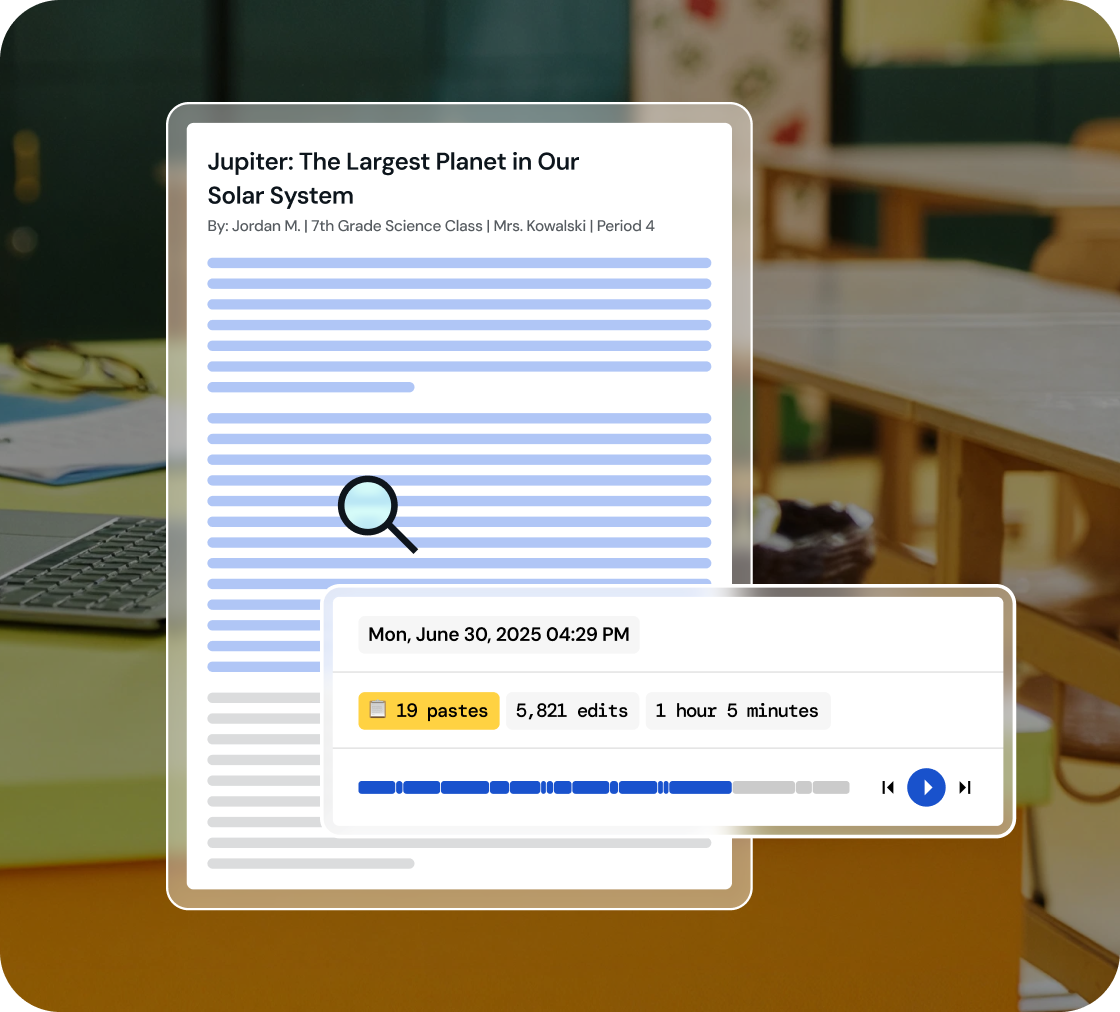
Dive into a replay of student work creation and effortlessly playback their revision journey, all within a comprehensive view.
02
Identify key writing milestones
Understand how student writing develops. Watch every stage of their process, from initial drafting and copy/pastes to the final adjustments.
03
Foster integrity in learning
Use 'Inspect Writing' to start discussions on academic honesty and nurture a culture of integrity in your classroom.
Inspect drafts, revisions, and final work
‘Inspect Writing’ shows a video-style replay of a student’s writing process from first draft to final version. See what they added, deleted, or pasted in, and how they responded to feedback. Brisk helps teachers track real-time growth and spot exactly where support is needed.
.svg)
Get a closer look at student writing practices
Through a video replay, track how students develop their writing - from copied content to sentence construction to post-feedback edits. Brisk gives teachers insight into each step of the process, making it easier to spot learning gaps and guide growth.
.png)
Engage in conversations on academic honesty
Use 'Inspect Writing' to start meaningful conversations about academic honesty in the classroom. Inspect Writing helps teachers build a culture of integrity and responsibility, making it easier to support honest academic behavior.
.png)

Haz tu día más ligero con Brisk
¡Gracias! ¡Hemos recibido tu envío!
¡Ups! Algo salió mal al enviar el formulario.
Preguntas frecuentes
¿Cómo debo usar la inspección de escritura con los estudiantes?
Brisk plantea la inspección de escritura como una herramienta para iniciar conversaciones. Si la reproducción de la escritura de un estudiante genera dudas, recomendamos aprovechar el momento para iniciar un diálogo sobre integridad académica y autoría.
¿La inspección de escritura funciona con Google Docs?
Sí. La herramienta de inspección de escritura de Brisk funciona directamente en Google Docs a través de la extensión de Chrome de Brisk. Los estudiantes escriben en Docs como lo harían normalmente y Brisk captura el proceso.
¿Es preciso el inspector de escritura de Brisk?
Brisk no genera una puntuación de precisión. En su lugar, te muestra un registro objetivo de cómo se redactó el documento.
¿Brisk detecta textos generados por IA?
Sí. Puedes crear y editar recursos de Brisk dentro de Word, PowerPoint y OneDrive.
Yes. Brisk helps teachers understand how students wrote, not just what they turned in, which is essential for supporting academic integrity and authentic learning.
With Brisk’s Inspect Writing tool, you can watch a video-style replay of a student’s full writing process in Google Docs, from first steps to final draft. You’ll see:
- When students wrote, including timestamps and how long the work took
- What they typed, edited, added, or deleted
- Where text may have been pasted in
- How they responded to feedback and revision prompts
This helps teachers verify authentic work, understand each student’s thinking, and pinpoint exactly where support or instruction is needed.