

بفضل خاصية إعادة العرض والتعليقات الإيجابية والبناءة، لم أعد أشعر بالرهبة من مساعدة طلابي في إنجاز كتاباتهم!
أدوات الذكاء الاصطناعي لتقييم وتصحيح الكتابة
بسّط عملية تقييم الكتابة باستخدام أدوات Brisk المدعومة بالذكاء الاصطناعي لفحص وتصحيح وتقييم أعمال الطلاب.
01
Visualize a student's writing process
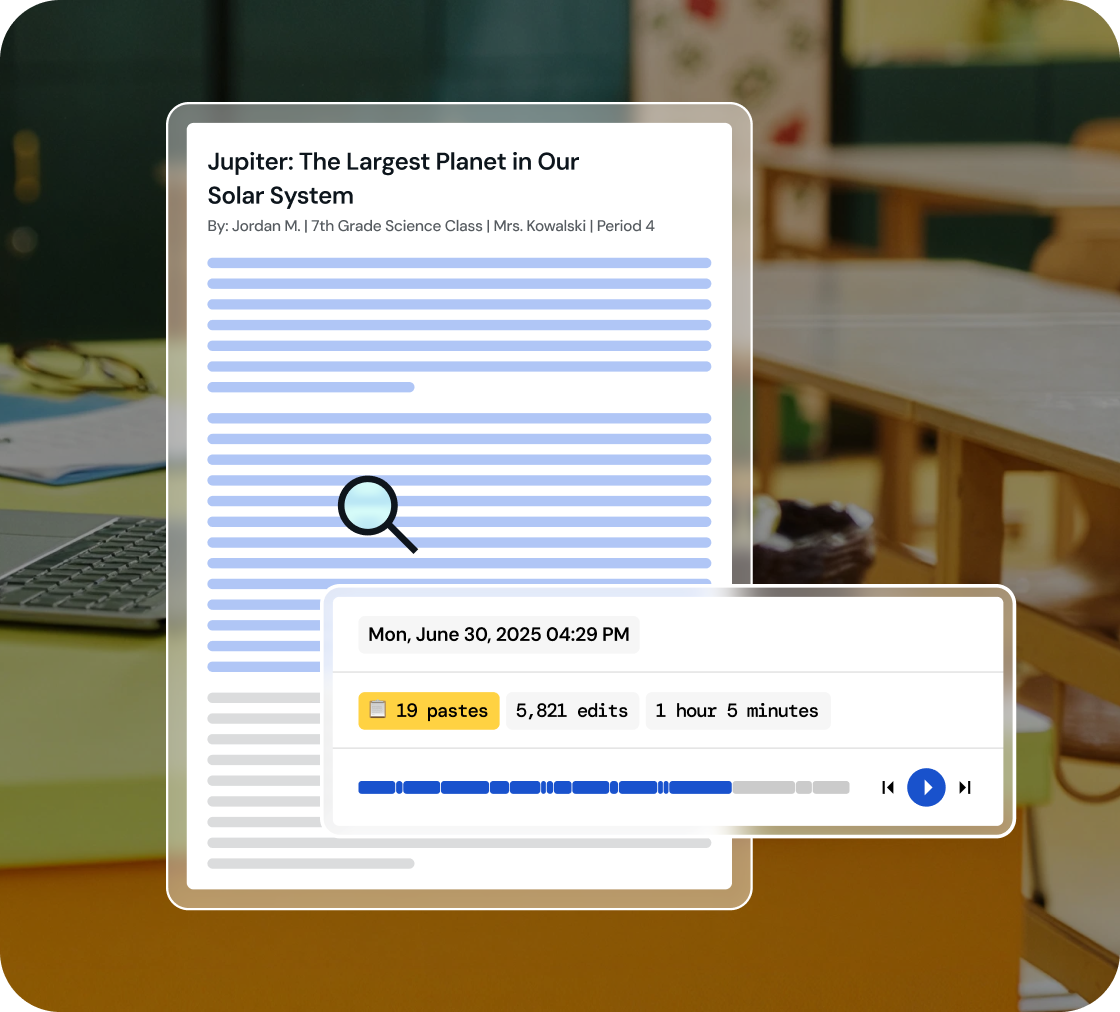
Dive into a replay of student work creation and effortlessly playback their revision journey, all within a comprehensive view.
02
Identify key writing milestones
Understand how student writing develops. Watch every stage of their process, from initial drafting and copy/pastes to the final adjustments.
03
Foster integrity in learning
Use 'Inspect Writing' to start discussions on academic honesty and nurture a culture of integrity in your classroom.
Inspect drafts, revisions, and final work
‘Inspect Writing’ shows a video-style replay of a student’s writing process from first draft to final version. See what they added, deleted, or pasted in, and how they responded to feedback. Brisk helps teachers track real-time growth and spot exactly where support is needed.
.svg)
Get a closer look at student writing practices
Through a video replay, track how students develop their writing - from copied content to sentence construction to post-feedback edits. Brisk gives teachers insight into each step of the process, making it easier to spot learning gaps and guide growth.
.png)
Engage in conversations on academic honesty
Use 'Inspect Writing' to start meaningful conversations about academic honesty in the classroom. Inspect Writing helps teachers build a culture of integrity and responsibility, making it easier to support honest academic behavior.
.png)

خفف أعباء يومك مع Brisk
شكراً لك! لقد تم استلام طلبك بنجاح.
عذراً! حدث خطأ ما أثناء إرسال النموذج.
الأسئلة الشائعة
كيف ينبغي لي استخدام أداة فحص الكتابة مع الطلاب؟
تعتبر Brisk أداة فحص الكتابة وسيلة لفتح باب النقاش. إذا أثارت عملية إعادة عرض كتابة الطالب تساؤلات، فإننا نوصي باستغلال هذه اللحظة لبدء حوار حول النزاهة الأكاديمية والتأليف.
هل تعمل أداة فحص الكتابة مع مستندات Google؟
نعم. تعمل أداة فحص الكتابة (Inspect Writing) من Brisk مباشرة داخل مستندات Google عبر إضافة Brisk لمتصفح Chrome. يكتب الطلاب في المستندات كالمعتاد، وتقوم Brisk بتسجيل العملية.
هل أداة فحص الكتابة في Brisk دقيقة؟
لا تقدم Brisk درجة دقة، بل تعرض لك سجلاً واقعياً لكيفية إعداد المستند.
هل تكتشف Brisk النصوص التي يتم إنشاؤها بواسطة الذكاء الاصطناعي؟
نعم. يمكنك إنشاء وتعديل موارد Brisk داخل Word وPowerPoint وOneDrive.
Yes. Brisk helps teachers understand how students wrote, not just what they turned in, which is essential for supporting academic integrity and authentic learning.
With Brisk’s Inspect Writing tool, you can watch a video-style replay of a student’s full writing process in Google Docs, from first steps to final draft. You’ll see:
- When students wrote, including timestamps and how long the work took
- What they typed, edited, added, or deleted
- Where text may have been pasted in
- How they responded to feedback and revision prompts
This helps teachers verify authentic work, understand each student’s thinking, and pinpoint exactly where support or instruction is needed.