All Blog Posts

How to Use AI to Create Engaging Activities for Your Students

Student engagement is harder to manufacture than it looks. Gallup's research on student engagement found that nearly eight in ten elementary students are engaged with school, but that number falls to four in ten by high school — a steady decline with every year students advance. A follow-up study found that fewer than two in ten students strongly agree that what they're learning feels important, interesting, or aligned with their strengths.

 A well-designed activity (that keeps students thinking, participating, and invested) requires material that feels relevant, tasks that match where students actually are, and feedback that arrives when it's still useful. General-purpose AI tools can help with ideation, but they don't know your students, curriculum, or classroom needs.

This guide covers eight approaches to using AI in ways that genuinely impact student engagement, and how Brisk Boost’s AI-powered student-facing activities can help your students grow, think, and develop AI literacy skills.

RUN AN AI-POWERED DEBATE

Debate builds critical thinking and communication skills, but the social pressure of debating in front of peers stops many students before they start. AI removes that barrier: students can practice arguing a position, receive pushback, and refine their reasoning independently before the class discussion begins.

Activity overview

Students choose a position on a topic you're studying and use an AI chatbot as their opponent. The AI argues the other side. Students have to respond to counterarguments they didn't prepare for, which is where the real thinking happens.

Sample prompt

"Have the student argue that [position]. You argue the opposing view. Start with your strongest counterargument, and push back whenever the student’s reasoning is vague or unsupported."

How to use Brisk Boost for AI-powered student debates

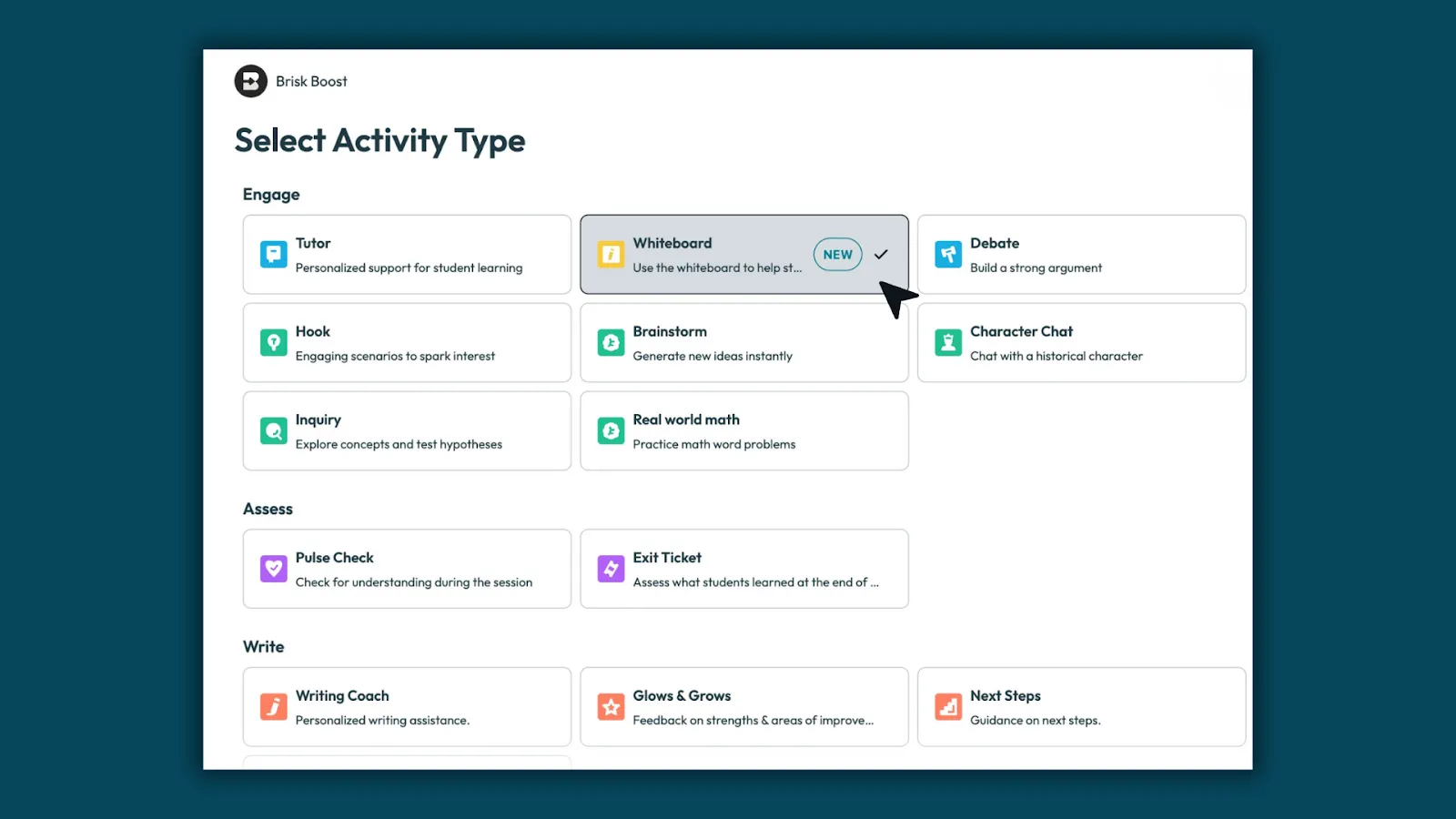
  • Open Brisk Boost, select the Debate activity type, set your topic and guardrails, and share a link with your students.
  • Students engage with the AI opponent in a monitored environment.
  • You can read every exchange from your dashboard and see which students are engaging substantively and which are going through the motions.

USE AI AS A WRITING COACH, NOT A WRITING TOOL

The most common misuse of AI in writing instruction is asking it to improve a student's draft. The AI rewrites, the student accepts the changes without reviewing the feedback, and nothing was learned.

A writing coach AI works differently: it reads the draft and asks questions like: What are you trying to argue in this paragraph? What evidence supports it? Where does your reasoning get fuzzy? The student has to answer and iterate themselves.

Activity overview

Students share a paragraph or draft with the AI and answer one question — what is the goal of the paragraph? — before they receive any feedback. The AI responds with one specific observation about whether the writing achieves that goal, then asks another question. Students revise and repeat. The cycle continues until the draft does what the student intended.

Sample prompt

"Have the student share a paragraph they’ve written about [source]. Ask them what their main point is supposed to be. After they answer, tell them one specific thing in the paragraph that works against that goal. Then ask them a question. Don't rewrite anything."

How to use Brisk Boost to help students with their writing 

  • Select the Writing Coach activity type, upload your rubric or a mentor text as the reference document, and restrict feedback to the dimension you're targeting — thesis, evidence, transitions, specificity.
  • Students paste their draft, the AI coaches, and you review conversation logs after to see who engaged with the feedback and who needs a follow-up conference.

HAVE STUDENTS SHOW THEIR THINKING WITH BOOST WHITEBOARD

Written responses tell you what a student concluded. Having them show their thinking visually tells you how they got there.

Activity overview
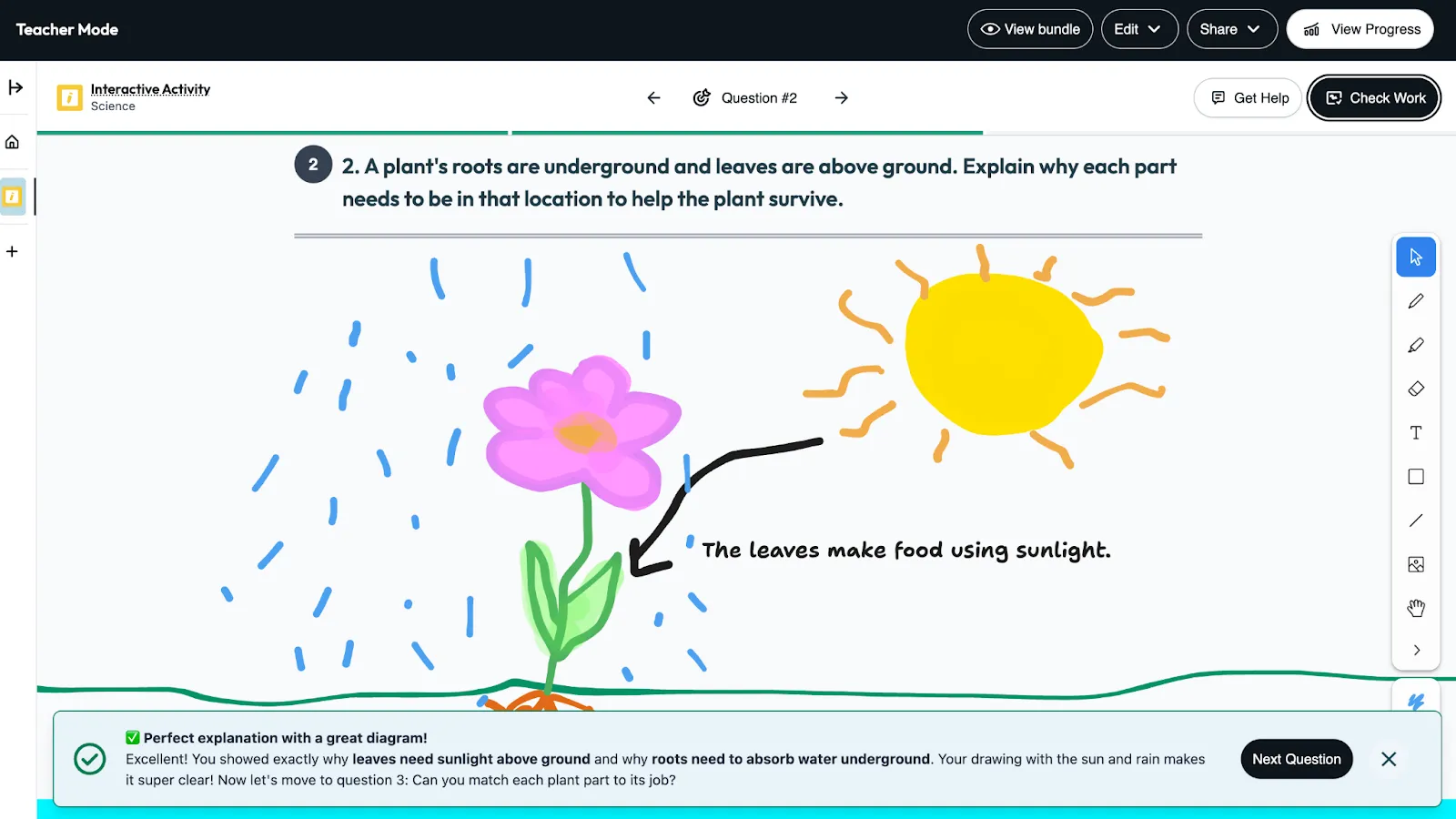
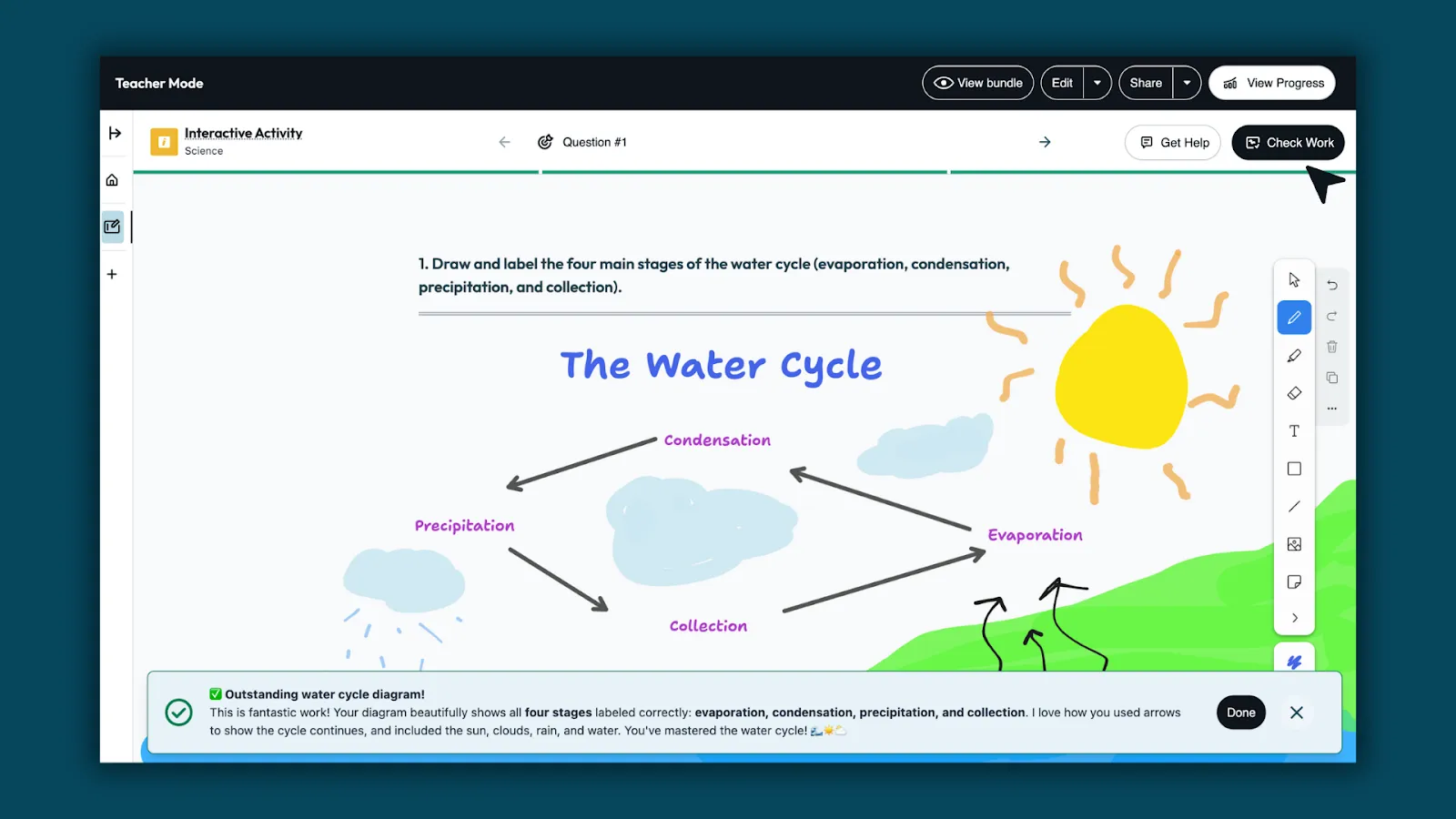
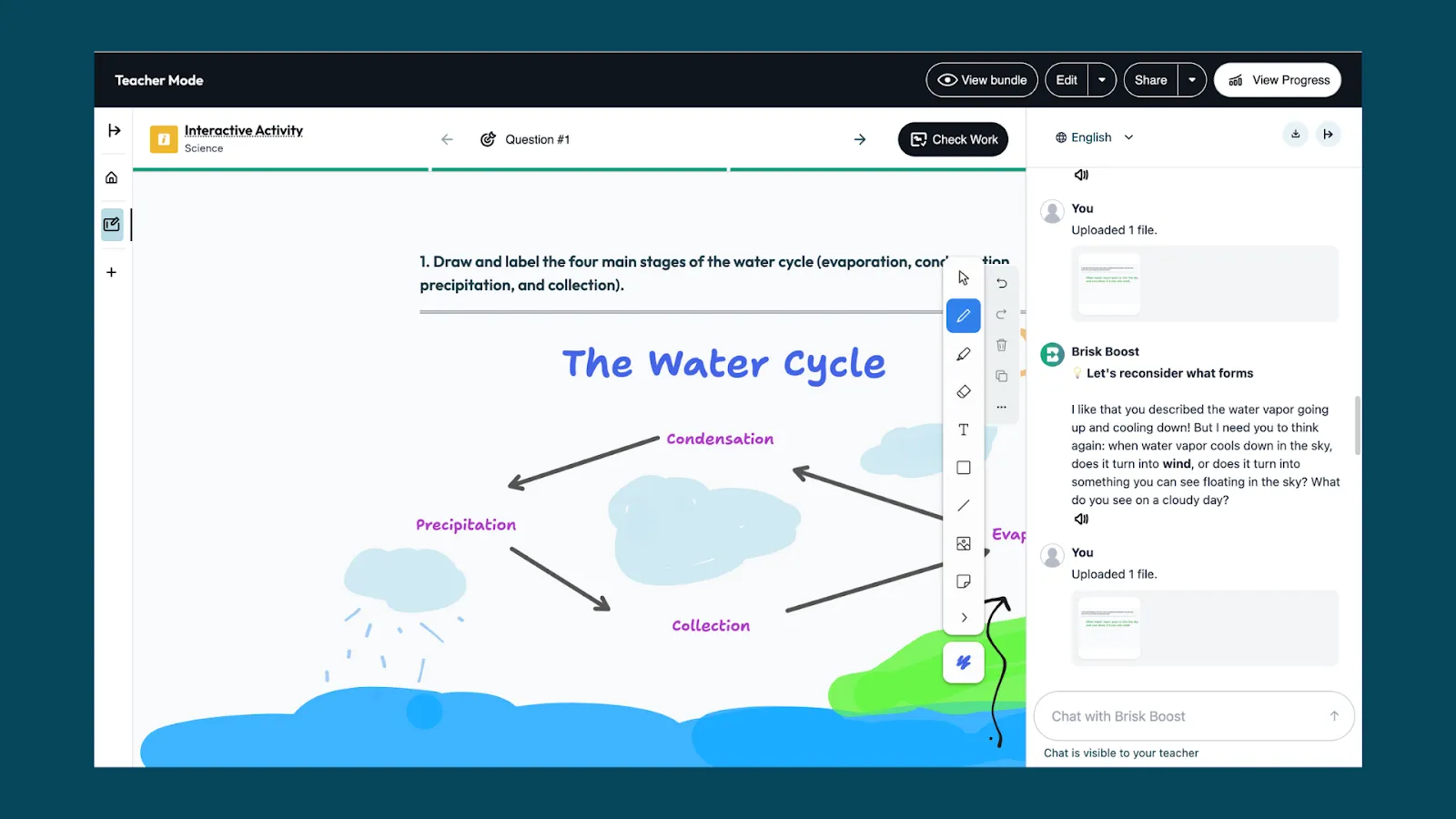
Students sketch, label, and annotate directly on a digital whiteboard in response to a prompt you set. Student engagement-focused AI tools like Boost Whiteboard allow you to watch students work through ideas while built-in support helps them stay engaged.

This works particularly well for concepts that are hard to capture in writing alone: scientific diagrams, mathematical models, timelines, and cause-and-effect maps.

Sample prompt
"Draw and label a diagram showing [concept].”

How to have students show their thinking with Boost Whiteboard

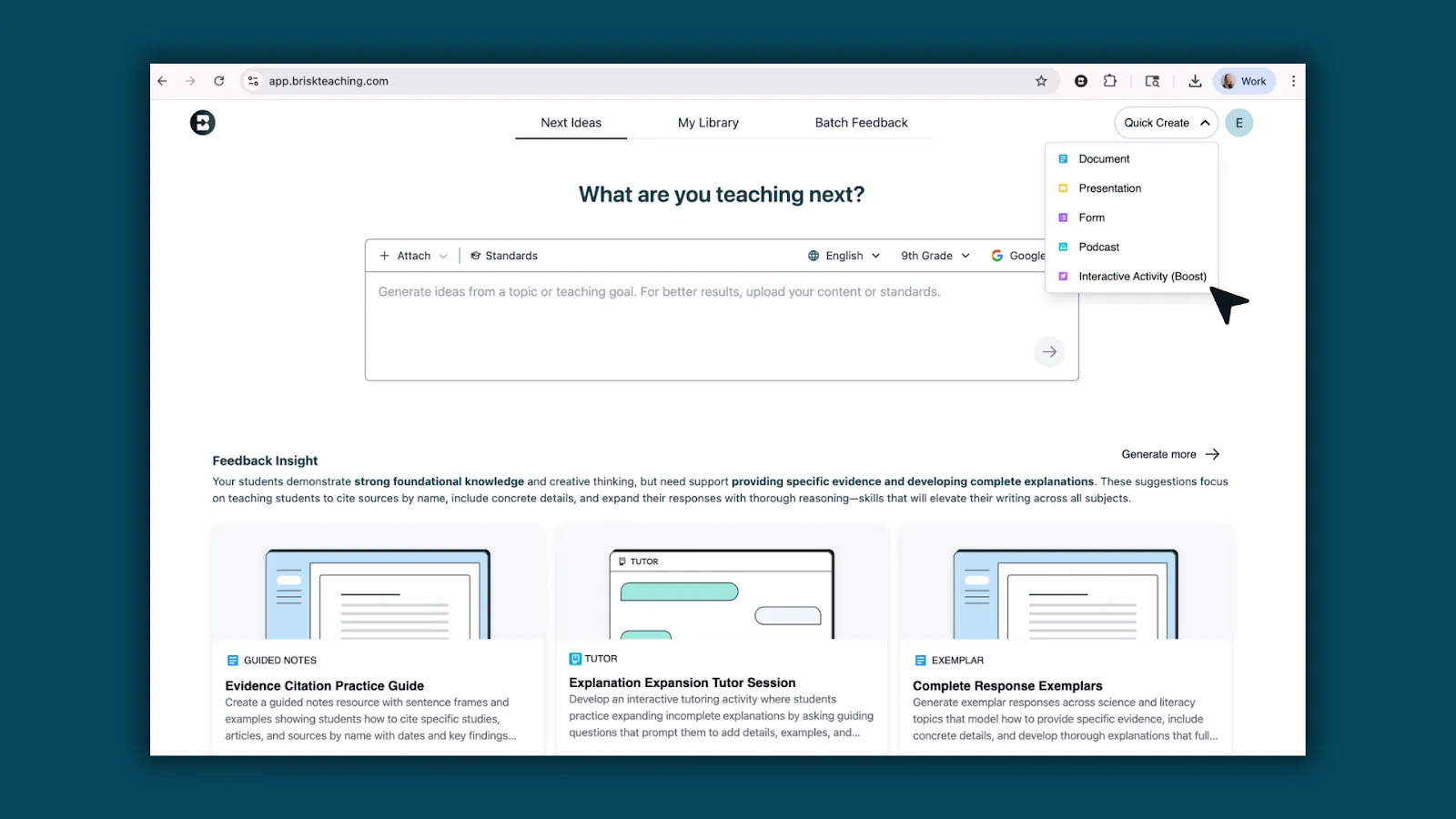
  • Open Brisk and click Boost Student Activity, then select Whiteboard.
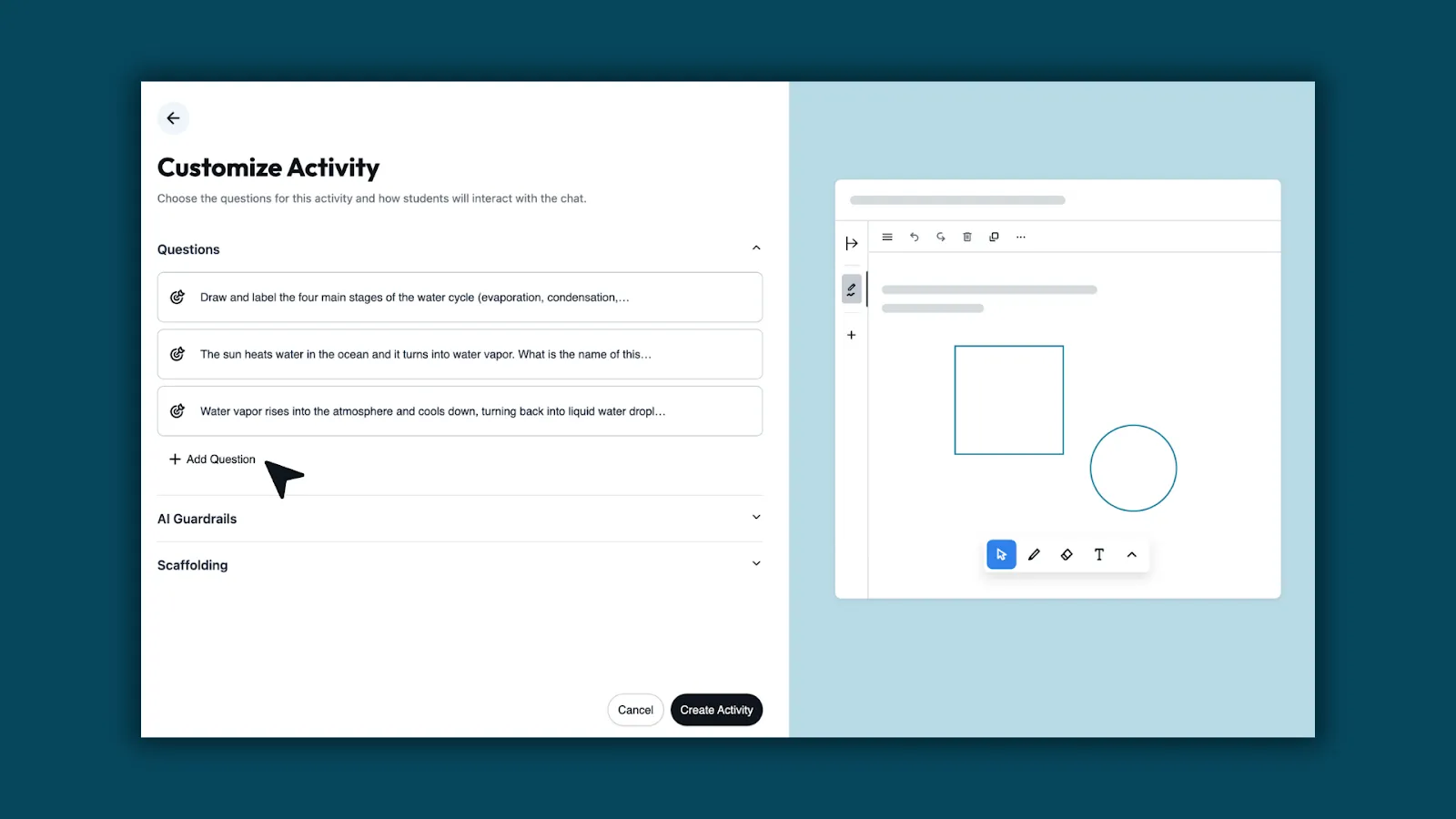
  • Enter your prompt and set grade level, standards, and language. Brisk generates a template based on your input.
  • Customize if needed: refine the question or adjust the guardrails.
  • Share the link. Students open the whiteboard and start working. No student accounts required.
  • Watch thinking develop and use what you see to decide what to address.

Learn more about Boost Whiteboard →

TURN ANY RESOURCE INTO AN INTERACTIVE INQUIRY

AI makes it possible to turn any reading material into a genuine back-and-forth where students have to explain what they understand and be pushed on what they don't.

Activity overview

Students read an article, watch a video, or work through a document, then interact with an AI chatbot that asks them to explain, justify, and question what they encountered. The chatbot doesn't move forward until the student gives a substantive answer. If their response is vague, it asks them to be specific. If they miss something important, the chatbot asks for a follow-up that points them back to the text.

This works across subject areas:

  • Science: Students explain a concept back to the AI after watching a video, and the AI identifies gaps in their explanation
  • Social studies: students engage with a primary source and the AI asks them what the author would think about a current event.
  • Math: Students walk the AI through their problem-solving process step by step.

Sample prompt

"The student just read [source]. Ask them one open-ended question about what they read. When they respond, ask for a follow-up that requires them to point to something specific in the text. After two exchanges, ask: 'What question does this source leave unanswered?'"

How to use Brisk Boost for interactive inquiry activities

  • Open your source — any article, PDF, Google Doc, or YouTube video — and click the Brisk extension.
  • Select Boost Student Activity, and choose Inquiry.
  • Set your learning objective, add your prompt, and share the link.
  • Students work through the source alongside the AI, and you see every conversation in your monitoring dashboard.

HOOK STUDENTS WITH AN AI-GENERATED SCENARIO

The first five minutes of a lesson can often determine whether students are actually engaging with the rest of it. An interesting hypothetical scenario creates the kind of cognitive engagement that makes new content stick.

AI makes it fast to generate hooks that are specific to your content, your students' grade level, and their interests. Rather than opening with the textbook definition of a concept, you open with a situation that requires understanding that concept to resolve.

Activity overview

Tell the AI your topic, your grade level, and something about what your students find interesting or relevant. Ask it to generate three different hook scenarios. Pick the one that best fits your class. Run the scenario as a brief whole-class discussion before introducing the lesson content to get students primed for the lesson.

Sample prompt

"I'm teaching [topic] to [grade] students. Generate three short, provocative scenarios that would make students want to understand [concept] in order to resolve the situation. Make the scenarios feel current and relevant to teenagers."

How to use Brisk Boost to hook students with scenarios

  • Use the Hook activity type to turn the scenario into an interactive experience.
  • Students engage with the setup individually or in pairs before the whole-class discussion, which means everyone arrives with a position rather than waiting to hear what someone else says first.

PERSONALIZE PRACTICE WITHOUT MULTIPLYING YOUR PREP

Differentiation is one of the most persistently difficult demands of classroom teaching. Most teachers want to reach every student where they are but don’t have time to build three different versions of every activity.

AI makes differentiated practice achievable without tripling the workload.

Activity overview

Differentiation works best when the task itself stays rigorous and what changes is the level of support students receive getting there. Rather than building separate activities for different learners, configure the AI’s scaffolding around a single task: students who need more structure get smaller steps, vocabulary support, and more frequent check-ins. Students who are ready to go further get fewer prompts and more independence.

Sample prompt

For a student who needs more support, your scaffolding instruction might read: "Break the task into smaller steps. After each step, ask the student to confirm their understanding before moving on. Define any unfamiliar terms using simple language."

For a student ready to go further: "Minimize step-by-step guidance. Push the student to make independent decisions and explain their reasoning before moving on."

How to differentiate activities with Brisk Boost

  • Create any Boost activity. Choose your activity type, add your source or prompt, and set your learning objective.
  • In the scaffolding settings, review the guidelines Brisk has auto-populated based on your prompt.
  • Adapt them for each group: more checkpoints and vocabulary support for students who need it and less hand-holding for students who don't.

GIVE EVERY STUDENT A RELIABLE STUDY PARTNER

Peer study has well-documented limitations: students overestimate what they know, conversations drift off-topic, and the student who already understands the material ends up doing most of the explaining. An AI study partner doesn't have these problems. If tailor-made for the classroom, it will only give hints, not answers.

Activity overview

Instead of having the AI explain content to students, students explain content to the AI. The AI listens, identifies what's incomplete or incorrect in the student's explanation, and asks follow-up questions. Students are forced to surface and address their own gaps rather than passively receive information.

Sample prompt

"Have the student explain [concept] to you. If they get something wrong or seem confused about part of it, ask them a follow-up question that helps them find the problem in their own explanation. Don't tell them the answer; ask them a question that helps them figure it out."

How to use Brisk Boost to help students learn

  • Select the Tutor activity type, set your learning objective, configure the chatbot to ask guiding questions rather than give answers, and share the link.
  • Students who finish early, need review, or are working at home have access to personalized support on demand without needing a teacher present.

💡 Ottawa Catholic School Board, which deployed Brisk Boost to 53,000 students across 90 schools, heard this from a student: "Now that there's Boost, I don't have to wait for the teacher." Another student added: "It helps you improve and learn instead of just getting the answers." Read the full story.

CHECK FOR UNDERSTANDING IN REAL TIME

Formative assessment is most useful when it happens during learning, not after. But traditional check-in methods like asking the class, circulating to read student work, and polls only tell you roughly how the class is doing, not specifically what each student understands. AI-powered formative checks give you student-level data in real time.

Activity overview

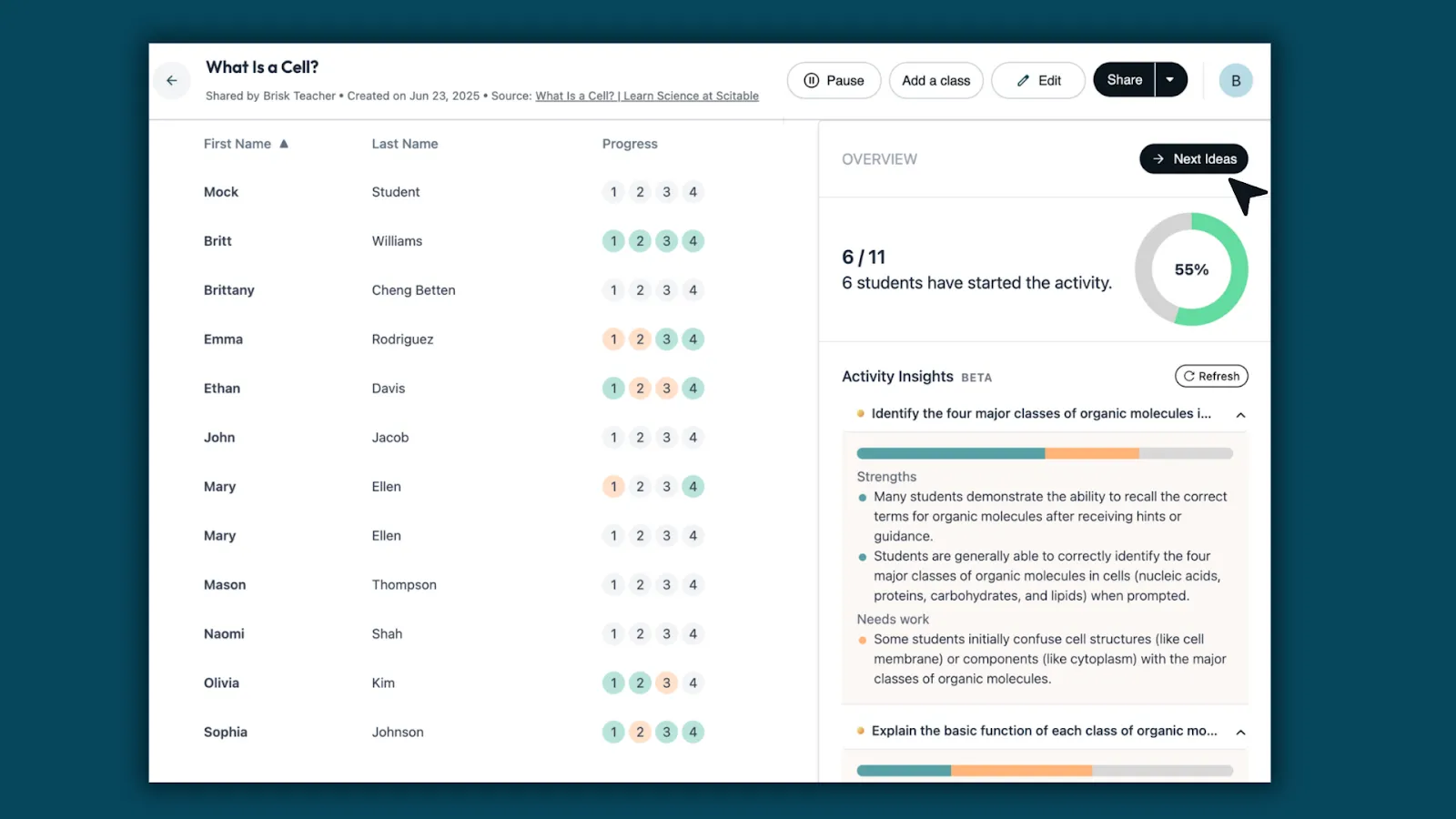
Students interact with a chatbot configured to probe their understanding of a specific concept. You know exactly which students are ready to move on, which ones have misconceptions, and which ones need your help.

Sample prompt

"Ask the student to explain [concept] in their own words. If their explanation is missing something important, don't tell them what's missing — ask a question that helps them find it. After two exchanges, ask: 'What part of this are you still least sure about?'"

How to check for understanding with Brisk Boost

  • Use Pulse Check for mid-lesson formative checks or Exit Ticket for end-of-class assessments. Both give you individual student data without requiring a grade.
  • The conversation logs show you not just whether a student got it right, but how they reasoned their way to an answer.

WHAT MAKES AI ENGAGEMENT ACTIVITIES WORK?

Across all of these activities, the same principle holds: AI engages students when it creates a feedback loop that requires them to think again. The student produces something, the AI responds with specificity, and the student has to decide what to do with that feedback.

When students use AI to skip the hard part, they complete the task without doing the learning. The activities above are designed so that's not possible. The AI is configured to ask questions, not give answers.

The other factor is teacher oversight. The teachers getting the most out of AI-powered activities aren't stepping back and hoping for the best – they're watching what's happening and using data. AI gives teachers more visibility into student thinking than most traditional activities do.

FAQs

How do I keep students on task when using AI tools in the classroom?

Task design matters more than monitoring. Students go off-task when the AI activity is open-ended. Every activity above is structured around a required output; when the task has that kind of structure, staying on task and doing the task are the same thing.

That said, real-time visibility helps. Tools like Brisk Boost let you see every student's conversation from your dashboard as it's happening, so you can redirect a student who's gone sideways before the period is over rather than after. Brisk Boost also sets guardrails, meaning that the AI doesn’t permit the student to go rogue.

How can I use AI for student engagement without compromising academic integrity?

The key is configuring AI as a thinking partner rather than a production tool. In every activity above, the AI's role is to ask questions, give targeted feedback, or push back on reasoning – not to generate content the student submits as their own. When students have to respond to the AI's questions in their own words, there's nothing to plagiarize. What they produce is the product of their own thinking.

Is AI safe to use with students? What about data privacy?

This depends on the tool. General-purpose AI tools like ChatGPT, Gemini, and Claude may not meet K–12 data privacy requirements (FERPA, COPPA). Purpose-built tools for education handle this differently. Brisk Boost, for example, is SOC 2, FERPA, and COPPA compliant. Student conversations are not used to train AI models. Students access activities through a link – no account creation with personal information required.

What AI tools are teachers using to engage students?

Commonly cited tools include Brisk Teaching (particularly Brisk Boost for student-facing activities), Curipod, Kahoot, Snorkl, and Diffit.

The right tool depends on the activity: game-based engagement, AI tutoring, writing feedback, and formative assessment each have tools that are better suited to them. Brisk Boost is notable for combining several of these use cases (debate, writing coaching, inquiry, tutoring, and formative assessment) in a single platform with teacher oversight built in.

Heading 1

Heading 2

Heading 3

Heading 4

Heading 5
Heading 6

Lorem ipsum dolor sit amet, consectetur adipiscing elit, sed do eiusmod tempor incididunt ut labore et dolore magna aliqua. Ut enim ad minim veniam, quis nostrud exercitation ullamco laboris nisi ut aliquip ex ea commodo consequat. Duis aute irure dolor in reprehenderit in voluptate velit esse cillum dolore eu fugiat nulla pariatur.

Block quote

Ordered list

  1. Item 1
  2. Item 2
  3. Item 3

Unordered list

  • Item A
  • Item B
  • Item C

Text link

Bold text

Emphasis

Superscript

Subscript

Latest Posts

Latest from the Brisk Blog

Explore practical articles for K–12 educators, from classroom-ready strategies to thoughtful guidance on using AI in ways that support real teaching.

Library shelves filled with books
August 14, 2026
Thought Leadership

Brisk in New White Paper on AI's Instructional Impact

Brisk founder Arman Jaffer shares his key takeaways from Whiteboard Advisors’ new white paper on measuring the instructional impact of AI in the classroom.

AI is in the midst of a massive hype cycle. You know. I know it. Any person you stop on the street knows it. That doesn’t mean AI is all hype — far from it. It just means that, especially in a field like education, we shouldn’t treat every use of AI as equally valuable.

As with any tool, technology, or technique, our ability to scale the benefits of AI will hinge on how effectively we quantify AI-supported practices in the classroom. To that end, we recently commissioned a white paper from Whiteboard Advisors, “From Efficiency to Efficacy: Measuring AI’s Instructional Impact,” that explores a new way to approach this measurement.

The white paper details the need for a well-defined framework for connecting AI use to the learning science principles that research tells us drive student outcomes. It highlights the newest metric that school and district leaders will see in their Brisk dashboards this year, Quality Instructional Moments, as a strong example of how educators can draw these connections.

AI helps teachers do more of what they know works

There are decades upon decades of peer-reviewed research on the kinds of instructional practices that promote student achievement. The biggest obstacle to effective teaching isn’t knowing what to do, but finding the bandwidth to do it. As the white paper states:

We know that students learn better when they receive frequent, specific feedback rather than waiting weeks for a test grade. We know that students learn more when they’re working at the edge of their ability, challenged but not overwhelmed. And we know that the practices most likely to move students — responsive instruction, meaningful relationships, timely feedback and intervention — are also the ones most likely to get crowded out by everything else educators are asked to do.

Minimizing this “crowding out” is where AI has the greatest potential in education. AI isn’t a replacement for great teaching; it’s the infrastructure that makes it possible to implement proven practices with greater frequency, fidelity, and consistency.

Moving from higher productivity to increased teaching capacity

To reiterate: AI’s true value is not just that it enables teachers to do more, but that it enables them to do more of what really works.

Which is not to say that productivity and efficiency boosts are meaningless. For a long time, Brisk measured our impact in terms of hours saved on tasks like grading, resource writing, and administrative work. We all want to save time wherever we can — no harm in that. But as school and district leaders repeatedly asked, “How does Brisk actually support student learning?”, we realized we needed to take a more comprehensive view of what happens in the classroom.

What really matters is what teachers do with the time they save. When they reinvest the time in implementing proven instructional practices — differentiating instruction for every student, using data to drive decisions, intentional planning — that’s when student outcomes tend to improve.

Using Quality Instructional Moments as a leading indicator of learning

You might be wondering, “How do you track if and when any of this is happening?” It’s a good question.

Traditional success metrics like standardized test scores and graduation rates paint part of the picture, but they lag years behind the instructional actions that shaped them. In an effort to provide leaders with a leading indicator of effective instruction, we landed on Quality Instructional Moments.

As we define it, an instructional moment is a discrete, observable student interaction that:

  1. Is grounded in learning science;
  2. A teacher wouldn’t have been able to facilitate on a regular basis without the increased capacity carved out by AI.

Think: A teacher uses Brisk to provide every student with personalized, rubric-aligned feedback on the same day students turn in their essays. Or, a teacher uses Brisk to generate multiple versions of an activity to ensure each student’s assignments are challenging enough to promote growth but scaffolded enough to remain achievable.

These are the kinds of instructional moments that drive results. They’re also the kinds of moments that school and district leaders can now track in Brisk. (We get that every district has different priorities, so districts are able to customize how they measure instructional moments in Brisk based on their unique pedagogical approach.)

Get the full story

Whiteboard Advisors’ white paper does a great job of unpacking all the considerations that go into tracking AI’s impact in the classroom. It covers the entire spectrum of research-backed instructional practices that ground instructional moments, the five questions every district leader should ask when evaluating AI solutions, and a whole lot more.

It’s a quick and, for those of us who are interested in these things, incredibly compelling read. I’d encourage you to check it out.

– Arman Jaffer, Founder, Brisk Teaching

Library shelves filled with books
July 27, 2026
Tips for Teachers

60 Get-to-Know-You Questions for Students (For Every Grade)

60 get-to-know-you questions for students, organized by category and grade — plus, easy ways to use them for icebreakers, morning warm-ups, and first-day connection.

The first week of the school year sets the tone for the months of learning that follow. The fastest way to establish a classroom environment in which students feel comfortable talking, laughing, and taking productive risks together is to provide regular opportunities for students to build meaningful connections with each other.

A good set of get-to-know-you questions can do a lot of the heavy lifting here. These questions lower the temperature for nervous students, give quieter kids an easy on-ramp into discussions, and show you what kind of personalities you have in the room before you even start your first lesson.

Below are 60 get-to-know-you questions for students, sorted into categories you can pull from all year — not just on day one. (Skim to the grade-specific notes near the end for tips for getting the most out of these questions in your classroom.)

How to Use Get-to-Know-You Questions

While these questions are invaluable during the first week of school, they’re just as powerful in many other contexts throughout the year. In addition to using them as first-day icebreakers, always keep a few on hand for:

  • Morning (or class period) warm-ups: Pose one question a day (or every Monday) to get everyone’s juices flowing.
  • Exit tickets: Use a reflection question to keep students engaged during the final few minutes of class.
  • Digital or remote learning: Drop a question into a poll, a shared doc, or a discussion board so students can answer without the pressure of the spotlight. If you want a quick set of interactive questions tailored to your grade and subject, you can generate them with Brisk Boost, a student-facing, AI-supported workspace that puts you in control of what’s shared.

Regardless of when you’re using these get-to-know-you questions, make sure you keep these best practices in mind:

  • Keep it low stakes: Let students pass if a question doesn’t land for them, and answer the questions yourself so the sharing feels mutual.
  • Specify a format: Pick a response format that aligns with the energy in your classroom on the day, whether it’s a turn-and-talk with a partner, a quick go-around, a written response, or a digital poll.
  • Return to high-impact questions: Asking a question in September and then again in January is a great way to show students how much has changed over the course of a few months.

Icebreaker & First-Day Questions

These icebreaker questions for students invite short, low-stakes answers. Pair these with a few active icebreaker games to get everyone moving.

  1. What are you hoping this year will be like?
  2. What’s one word your friends would use to describe you?
  3. If we were going to pick a mascot for our class, what should it be?
  4. What’s something you’re looking forward to this year?
  5. What makes a classroom feel like a good place to be?
  6. What’s a fun fact about you that surprises people?
  7. What fictional world would you like to live in?
  8. What’s the farthest you’ve ever traveled from home?
  9. If you could switch places with anyone for a day, who would it be?
  10. What makes you feel welcome in a new group?

Fun & Favorites Questions

Easy, low-pressure questions are perfect for any time you need a quick warm-up.

  1. What’s something you’re really good at that most people don’t know about?
  2. If you had to eat only one meal for the rest of your life, what would it be?
  3. What’s the best movie or show you’ve watched recently?
  4. What song do you have on repeat right now?
  5. What’s your favorite way to spend a Saturday?
  6. If you could instantly master any skill, what would it be and why?
  7. What’s a book, game, or hobby you could talk about forever?
  8. What’s your go-to snack?
  9. What’s the best gift you’ve ever received?
  10. If you had a whole day with no plans, what would you do?

This-or-That & Would-You-Rather Questions

These this-or-that-questions for students promote whole-class participation. For a more active experience, let students respond with a hand gesture or by walking to one side of the room or the other.

  1. Summer or winter?
  2. Sweet or salty?
  3. Early bird or night owl?
  4. Books or movies?
  5. Mountains or beaches?
  6. Would you rather be able to fly or be invisible?
  7. Would you rather never have homework or never have a test again?
  8. Would you rather explore space or the deep ocean?
  9. Would you rather always be 10 minutes late or 20 minutes early?
  10. Would you rather have a rewind button or a pause button for your life?

Getting Comfortable Questions

A step past the icebreakers, these questions help students share a little more about themselves once the classroom has been established as a welcoming environment.

  1. Who’s someone you look up to, and why?
  2. What’s something you’ve worked hard to get better at?
  3. What’s a tradition your family or friends have?
  4. When do you do your best thinking?
  5. What’s a mistake that taught you something?
  6. What’s something that always makes you laugh?
  7. Where’s your favorite place to be?
  8. What’s a small thing that makes any day better?
  9. What have you been curious about lately?
  10. What’s something you’d love to spend more time doing?

Questions About Learning & School

These are the kinds of questions to ask students when you want insights you can incorporate directly into your teaching — how students learn, what helps them, and what gets in their way.

  1. What’s a subject or topic you genuinely enjoy?
  2. How do you like to work best: alone, in pairs, or in a group?
  3. What helps you focus when things get noisy or busy?
  4. What’s something a teacher has done that really helped you?
  5. When you’re stuck, what do you usually do first?
  6. What does a good day at school look like for you?
  7. What’s something you wish teachers understood about you?
  8. How do you like to get feedback on your work?
  9. What’s a goal you have for this year?
  10. What’s one thing that would make this class better for you?

Social-Emotional Learning Questions

Save these questions for later in the year, as they require a certain level of trust and familiarity among students.

  1. What does being a good friend mean to you?
  2. When was a time you felt really proud of yourself?
  3. How can you tell when someone’s having a hard day?
  4. What helps you calm down when you’re frustrated?
  5. What’s something kind someone did for you that you still remember?
  6. Who do you go to when you need help?
  7. What are you grateful for right now?
  8. What’s something you’d like to get better at as a classmate?
  9. What makes you feel respected?
  10. What inspires you?

Picking the Right Questions for Your Grade

  • Elementary school: Start with favorites and this-or-that questions. As you incorporate more complex questions, provide your answer first as a way to model what a complete response looks like. Movement voting — e.g., walking to the “sweet” side of the room or the “salty” side of the room — can help keep younger learners engaged.
  • Middle school: Make sure students are comfortable by using low-spotlight formats like written responses, anonymous polls, or partner shares before jumping into whole-class go-arounds. (Pro tip: Students at this age love debating would-you-rather questions.)
  • High school: Lean into the learning styles and SEL questions. Older students can handle real reflection, and they notice when you incorporate what they share into your teaching. Frame the conversations as “help me teach you well,” not just “share your feelings.”

Frequently Asked Questions

What makes for a good get-to-know-you question for students?

Early on in the school year, the best questions are specific, low stakes, and easy to answer in a sentence — favorites, would-you-rather choices, and light “tell me about yourself” prompts. Save deeper reflection questions for once you’ve built a positive classroom dynamic.

How do you use get-to-know-you questions in the classroom?

Use them as first-day icebreakers, daily warm-ups, exit tickets, or digital polls. Give students a clear format (partner talk, go-around, written response), let them pass, and answer each question yourself.

What questions can I ask to get to know my students better as learners?

Ask about what they enjoy learning, what helps them focus, and what they wish teachers understood. The answers will give you insights you can teach with, not just fun facts.

When should I use get-to-know-you questions?

The first week of school is the most obvious opportunity, but they’re just as useful after long breaks, when a new student joins your class, or any time you want to reset class energy.

Start the Year by Connecting with Your Students

You don’t need to step into the classroom on the first day of school and ask 60 get-to-know-you questions. In fact, you really shouldn’t — that might scare students a little.

Instead, pick five of your favorites for the first day, keep a few in your back pocket for slow moments, and work your way toward the deeper questions as trust develops. The questions may be simple, but the payoff can be huge: A class that knows each other, trusts you, and is ready to learn together.

Want to generate your own get-to-know-you questions in seconds? Use Brisk's Create Anything tool to generate a list of get-to-know-you questions tailored to your classroom needs in seconds. Free to use for teachers — get started with Brisk today.

Library shelves filled with books
July 20, 2026

30 Fun First-Day-of-School Activities [2026 Edition]

Kick off the year with 30 first day of school activities for elementary, middle, and high school — icebreakers, games, and get-to-know-you ideas, each with a Brisk prompt to get you started.

Set the Tone for the New School Year

While these activities are perfect for back-to-school season, they’re just as powerful anytime you want to build connection, spark curiosity, or shift the energy in your classroom. Whether you’re kicking things off with a new group, regrouping mid-semester, or hitting reset after a tough week, these ideas help you reconnect, recharge, and refocus — no matter the date on the calendar.

Students thrive when they feel safe, valued, and inspired. And that kind of classroom doesn’t just happen. It’s built in the small, intentional moments — where students get to reflect, laugh, lead, and learn with each other. That’s what these activities are designed for.

From creative icebreakers and curiosity sparks to reflection prompts and student-led challenges, this collection helps you create a space where students feel like they belong — and where learning feels meaningful, not mandatory.

Each activity includes a Brisk prompt to help you plan faster, personalize with ease, and meet every learner where they are. Here’s how to use them:

  1. Open Brisk in your Chrome browser.

  2. Click “Create Anything.”

  3. Copy and paste the prompt from this post.

  4. Customize it if needed, then generate your activity, resource, or discussion.

Whether you’re trying something new tomorrow or saving it for a future refresh, this list is here when you need it. 


Because what you do today sets the stage for what comes next.

Get-to-Know-You Games

Break the ice without the awkwardness.
These activities are designed to help students feel seen without the spotlight being too bright. Whether it’s laughing over shared quirks or finding out who else puts hot sauce on everything, these ideas ease students into the room while helping you start learning who they are. Low pressure, high connection.

1. Find Someone Who... with a Twist
Each student receives a bingo-style sheet — but instead of generic traits, include quirky prompts like “loves pineapple on pizza” or “can make a weird animal noise.”

  • Why it works: Students discover fun facts and unexpected common ground. 
  • Brisk prompt: Generate a playful “Find Someone Who” board with 25 unique, humorous, and culturally inclusive prompts for [insert grade level] students.

2. Would You Rather? Movement Game
Read off questions like “Would you rather teleport or time travel?” and students move to a side of the room to show their answer.

  • Why it works: Builds comfort, encourages participation, and gets students moving.
  • Brisk prompt: Create a list of 20 fun “Would You Rather” questions for [insert grade level] students.

3. Emoji Introductions
Students pick 3 emojis that represent them and explain why. Can be shared verbally, drawn, or written.

  • Why it works: Invites self-expression in a digital-native language.
  • Brisk prompt: Generate a prompt asking students to introduce themselves using only emojis and a brief explanation for [insert grade level] students. 

4. Personality Playlist
Each student picks a song that represents their energy or personality. Play short clips and have classmates guess who picked what.

  • Why it works: Fosters self-awareness and community through music.
  • Brisk prompt: Generate a student-friendly prompt: “If your personality were a song, what would it be and why?”

5. Memory Match: Name + Fun Fact Edition
Pair students to share a fact, then remix into a memory game: “This is Max — he once ate a cricket!”
 

  • Why it works: Makes names and stories stick through fun repetition.
  • Brisk prompt: Create a guide for a memory-style name game with student facts for [insert grade level] students.

6. Icebreaker Skits
Students act out mini scenes that represent a favorite hobby, habit, or summer moment.

  • Why it works: Adds movement, fun, and laughter to self-intros.
  •  Brisk prompt: Generate a list of silly skit prompts that students can act out in pairs or groups of three for [insert grade level] students.

Community + Belonging

Build a classroom culture where everyone matters.

From day one, students are looking for signs that this is a space where they belong. These activities help co-create that space — one where every voice is valued, and students help shape the culture they’re part of. You’re not just setting expectations — you’re setting the tone for trust, respect, and ownership.

7. Community Vision Board
Create a shared collage (paper or digital) of images and words that represent your ideal classroom culture.

  • Why it works: Visualizes collective values and sparks creativity.
  • Brisk prompt: Generate a classroom vision board activity where students co-create a vision for their ideal classroom environment.

8. Chain of Kindness
Each student writes a kind message for a classmate and links their message on a paper chain that grows daily.

  • Why it works: Fosters trust, kindness, and visibility.
  •  Brisk prompt: Generate sentence starters for student-to-student affirmations.

9. “We Are…” Identity Wall
Students each finish the phrase “We are…” with a word or phrase that reflects their background, values, or hopes.

  • Why it works: Emphasizes collective identity and diversity.
  • Brisk prompt: Create a reflective writing prompt that invites students to complete the phrase “We are…”

10. Culture Curators
Groups create mini exhibits (posters, slides, or videos) about their cultures, traditions, or favorite foods.

  • Why it works: Promotes cultural awareness and student agency.
  • Brisk prompt: Generate a template for a “Culture Curator” student presentation.

11. Respect Roundtable
Students write down what respect looks like, sounds like, and feels like — then turn it into class agreements.

  •  Why it works: Turns abstract values into real behaviors.
  •  Brisk prompt: Generate prompts that help students define respectful behavior in a classroom for [insert grade level] students.

12. Compliment Constellations
Each student draws their name at the center of a star and classmates write one-word compliments on rays radiating out.

  • Why it works: Builds a visible map of positive traits and inclusion. 
  • Brisk prompt: Generate a guide for creating visual “Compliment Constellations” for [insert grade level] students.

Looking for more ways to foster classroom community? Check out 75 Ways to Build Classroom Community  

Creativity & Expression

Let students show who they are—beyond the surface.
Your students aren’t just learners — they’re storytellers, artists, problem-solvers, and creators. These activities give them space to express their full selves while sparking imagination and joy. Bonus: you’ll quickly learn how they think, what excites them, and which learners light up when given creative freedom.

13. Design a Class Mascot
In teams, students invent a character that reflects their shared values and vibe.

  • Why it works: Promotes collaboration, humor, and belonging. 
  • Brisk prompt: Generate a prompt asking students to create and pitch a class mascot.

14. “Me in a Bag” (Remixed)
Instead of bringing in items, students draw or digitally collage five objects that represent them.

  • Why it works: Makes the activity more inclusive and creative.
  • Brisk prompt: Create a visual storytelling prompt: “Design a digital ‘Me Bag’ that shares five things about you” for [insert grade level] students.

15. Dream Classroom Design
Students sketch or model a dream classroom — complete with features that support fun, focus, and learning.

  •  Why it works: Combines imagination with critical thinking.
  •  Brisk prompt: Generate a STEM-based design prompt for reimagining the perfect learning environment through a [insert grade level] student lens.

16. One-Word Wall
Each student selects a word that reflects their mindset or intention for the year.

  • Why it works: Promotes introspection and builds a shared visual culture.
  •  Brisk prompt: Generate a reflection prompt to help students choose a meaningful “One Word” for the year.

17. Personal Coat of Arms
Design shields that highlight students’ values, strengths, and dreams.

  •  Why it works: Supports identity-building and artistic expression.
  •  Brisk prompt: Create a Coat of Arms template with guiding categories like “values,” “strength,” and “passion.”

18. Identity Maps
Students build webs showing different layers of who they are—family, interests, languages, and more.

  • Why it works: Builds empathy and celebrates multidimensional identity.
  • Brisk prompt: Generate identity map guiding questions that explore culture, community, and individuality.

Reflection & Leadership

Give students the mic — then get out of the way.
The first day isn’t just about learning names — it’s a chance to hear students’ hopes, experiences, and ideas for the kind of classroom they want to build. These activities foster student voice, agency, and leadership, helping students feel not just included, but essential to how the year unfolds.

19. Student TED Talks
2-minute talks on topics students love, know, or wonder about.

  • Why it works: Builds voice, courage, and confidence.
  • Brisk prompt: Generate a student-friendly planning guide for a short TED Talk for [insert grade level] students.

20. “Dear Future Me” Letters
Students write letters to themselves to open at the end of the year.

  • Why it works: Encourages goal-setting and emotional reflection.
  •  Brisk prompt: Create a guided “Dear Future Me” letter-writing template for [insert grade level] students. 

21. Student-Led Icebreaker Stations
Small groups design and lead their own quick games.

  • Why it works: Builds leadership and autonomy from day one.
  • Brisk prompt: Generate a list of creative icebreaker ideas students could choose from to lead.

22. Class Norms Design Sprint
Teams draft and pitch classroom norms, then vote on which to adopt.

  • Why it works: Makes expectations feel collaborative and democratic.
  • Brisk prompt: Generate a lesson guide for co-creating classroom norms through student pitches.

23. Hope & Wonder Walk

Invite students to anonymously share their hopes and questions for the year ahead—what they’re excited for, curious about, or unsure of. Then, walk through the responses as a class to spot shared themes and offer encouragement.

  • Why it works: This activity builds emotional safety and connection by helping students see they’re not alone in their thoughts.
  • Brisk prompt: Generate sentence starters like: “This year, I hope to…” or “One thing I wonder about is…” for 6th grade students. 

24. Timeline of Me
Students map key moments in their lives to reflect on growth and goals.

  • Why it works: Brings awareness to identity and builds connection.
  • Brisk prompt: Create a timeline activity that helps students map meaningful moments in their lives—highlighting personal growth, challenges overcome, and goals for the future. Include sentence stems like “A moment that shaped me was…” and “One goal I’m working toward is…”

Curiosity & Exploration

Start with wonder. Stay curious together.

What if the first day of school wasn’t just about routines—but about questions? These activities ignite student curiosity and open the door to discovery, showing learners that school is a place where their ideas matter and exploration is encouraged. Lead with wonder, and you’ll build momentum that lasts all year.

25. “What Do You Wonder?” Wall
Students write big, bold questions on sticky notes or digital boards.

  • Why it works: Builds a culture of curiosity and inquiry.
  • Brisk prompt: Generate a list of sample “I wonder…” starters across subject areas.

26. Me in Numbers Infographic
Students create an infographic using personal data: age, pets, screen time, books read, etc.

  • Why it works: Combines data literacy and self-expression.
  • Brisk prompt: Generate a prompt for a “Me in Numbers” data storytelling activity.

27. Book Tasting Café
Transform your classroom into a cozy café where students sample genres and share “flavor notes.”

  • Why it works: Makes book choice feel fun and social. 
  • Brisk prompt: Generate a genre menu and reading reflection prompts for a book tasting for [insert grade level] students. 

28. Curiosity Sparks
Use mystery items, images, or facts to spark discussion and theories.

  • Why it works: Activates wonder and group problem-solving. 
  • Brisk prompt: Create a set of curiosity-driven mini-mysteries to use on day one for [insert grade level] students. 

29. Silly Debates
Is cereal a soup? Should socks match? Students take sides and defend with logic.

  • Why it works: Teaches respectful argumentation with a twist.
  • Brisk prompt: Generate 10 lighthearted debate topics that are perfect for warm-up thinking for [insert grade level] students. 

30. Invent an Icebreaker
Challenge students to invent, test, and refine their own icebreaker activity.

  • Why it works: Puts creativity and student leadership at the center.
  • Brisk prompt: Create a challenge prompt for students to design and lead their own original icebreaker for [insert grade level] students. 

What You Build Today Shapes What’s Next

The best classrooms aren’t built in a day — but they are built in moments like these. When students feel connected, challenged, and inspired, everything else gets easier.

This list isn’t about checking a box or filling time — it’s about creating a space where students feel like they matter, and where learning actually feels worth it.

And with Brisk, you’re not just getting through the day. You’re planning with purpose, responding to real needs, and building toward something bigger — your next move, your next idea, your next level.

Whatever comes next, we’ve got you.

Explore all Brisk Teaching Tools here.

Library shelves filled with books
8
min
Brisk Features

Boost Whiteboard: Where Student Thinking Meets In-the-Moment Support

Boost Whiteboard is Brisk’s new multimodal whiteboard experience, built to make student thinking visible while learning is still happening. Learn more.

With Boost Whiteboard, students can work through ideas and get in-the-moment support as they learn. They think visually, express ideas, and show understanding across subjects — while teachers see how learning is developing and what to teach next.

Boost Whiteboard is Brisk’s new multimodal whiteboard experience, built to make student thinking visible while learning is still happening.

Seeing thinking while it’s happening

In most classrooms, we only see what students know after the work is finished. By the time we notice confusion or misconceptions, the learning moment has already passed.

But learning doesn’t happen at the end, it happens while students are still thinking, trying, revising, and explaining.

Boost Whiteboard was created for that moment.

It gives students a space to sketch, organize, label, and explain their ideas visually, and gives them support while they’re still working, when the feedback matters most.

A new kind of learning space

Boost Whiteboard isn’t just a digital whiteboard. It’s where students work through their thinking.

Instead of turning in a finished answer, students can:

  • Sketch and model ideas
  • Label and explain their thinking
  • Show steps and reasoning
  • Revisit and revise as they go

And when they get stuck, learning doesn’t pause. Students can check their work, ask questions, and keep moving forward.

How Boost Whiteboard works

1. Create a Boost activity

Start with Quick Create at app.briskteaching.com or the Boost Activity button in the Brisk extension.

2. Set up your whiteboard

Select Whiteboard as the activity type. Enter your topic, then choose standards, grade level, and language.

3. Customize your activity

Brisk generates questions designed specifically for visual responses, so students know how to show their thinking.

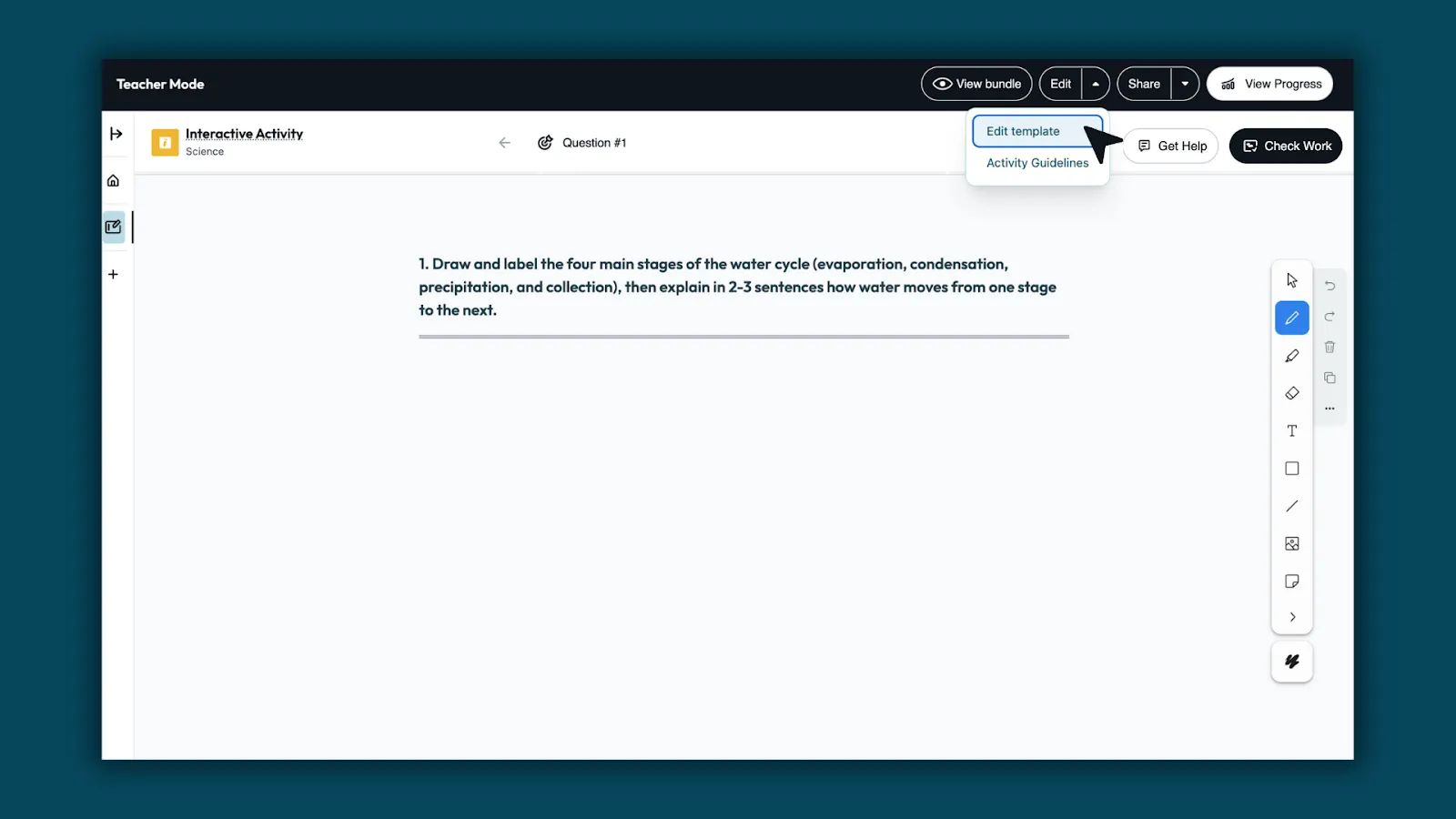
4. Edit template

Use Edit Template to refine the question, add images, or include visual supports.

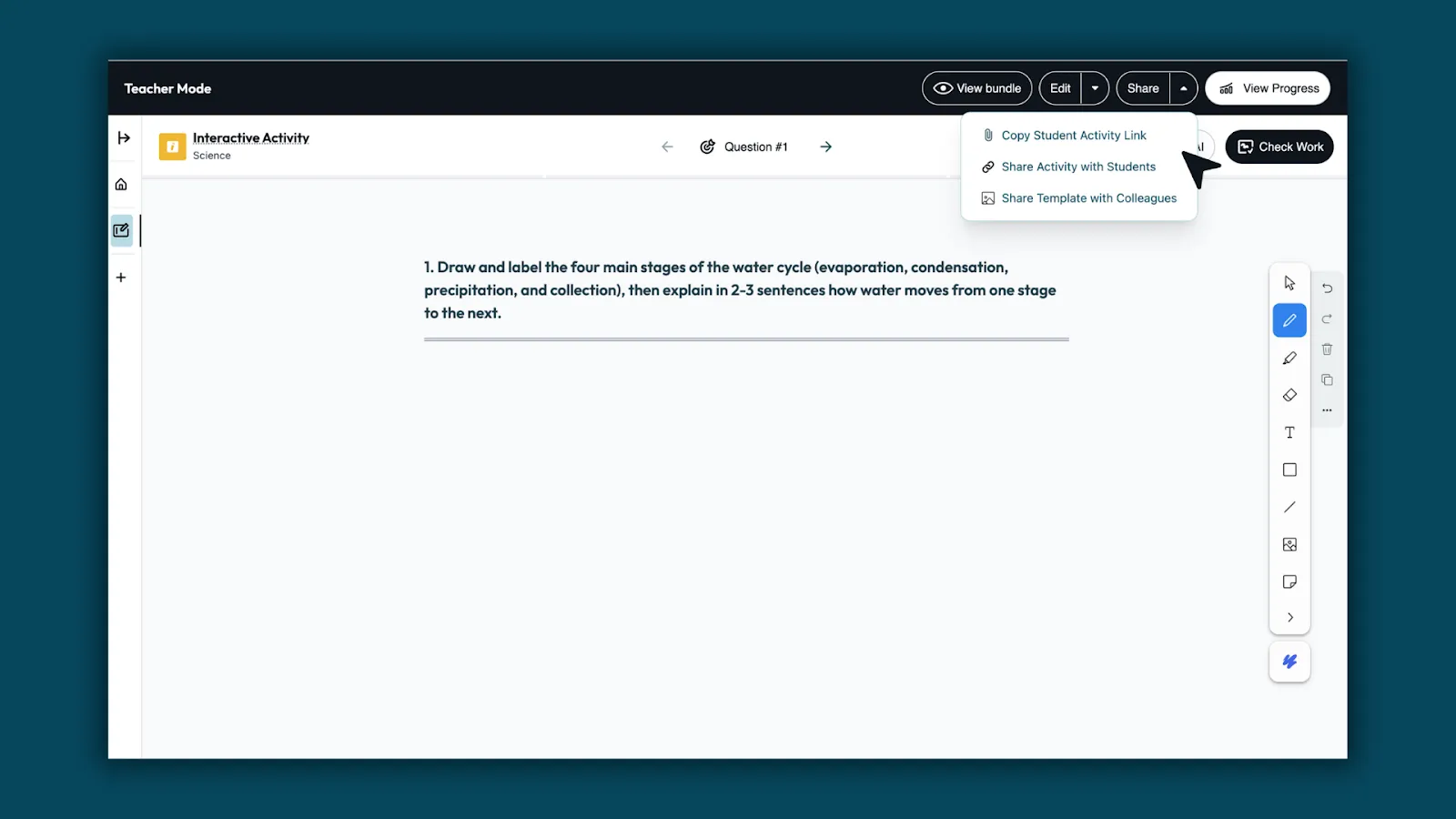
5. Share with students

Send the activity link or post it in your LMS. Students can open the whiteboard and begin working right away.

What students experience

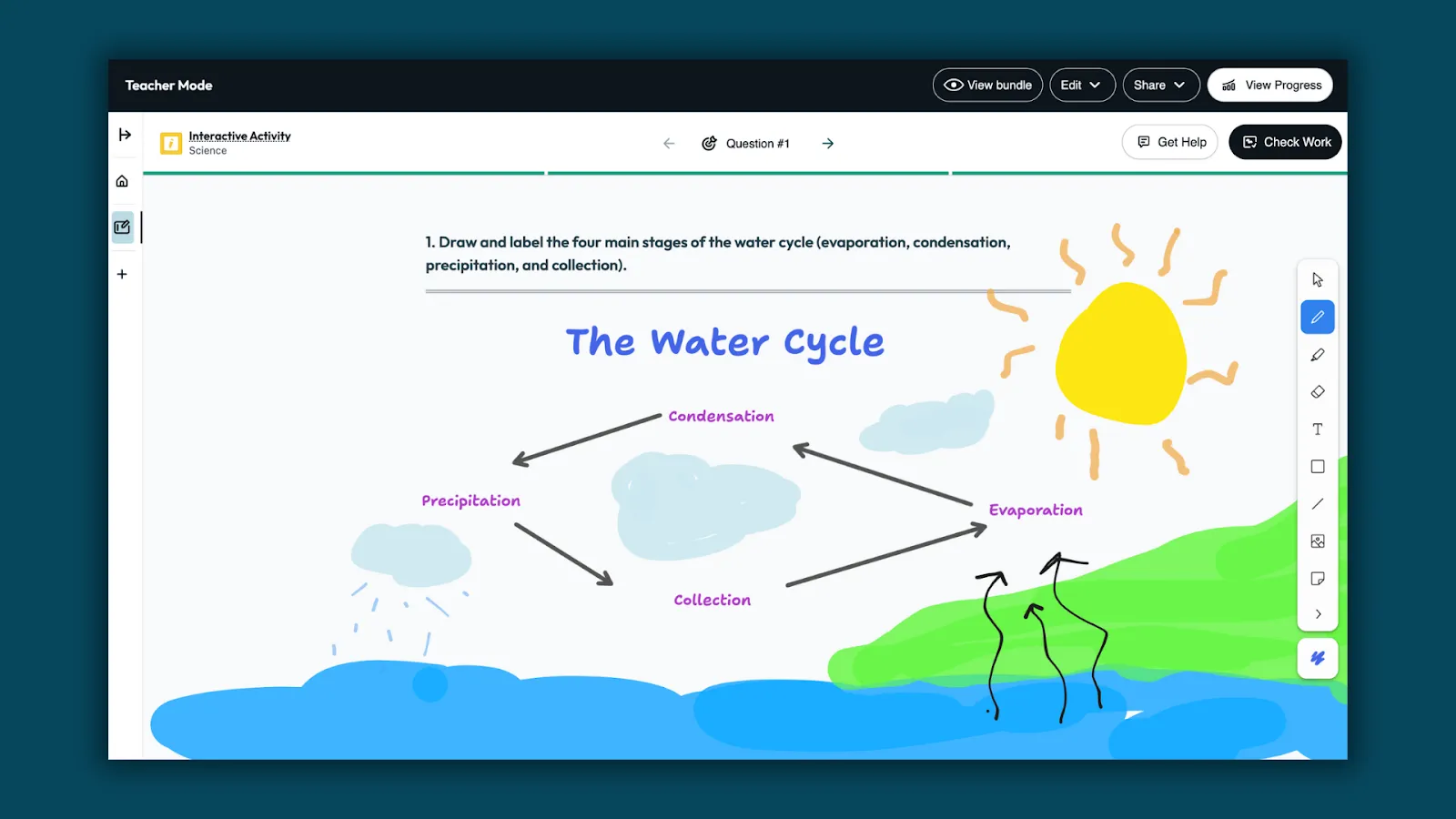
Show thinking visually

Students draw, label, and explain ideas directly on the whiteboard.

Get feedback with Check Work

When ready, students select Check Work to receive feedback from Brisk Boost. Feedback highlights what’s correct and points out where revisions may help, so learning keeps moving.

Use Get Help for support

Students can use Get Help to clarify ideas, reflect, and decide what to do next—without being given answers.

What teachers see

Classwide insights

Teachers can review all student whiteboards in one place. Brisk surfaces patterns across the class, showing what students understand, where they need support, and who’s ready to move forward.

Next-level teaching ideas

Based on those insights, Brisk recommends next steps and learning materials — helping teachers decide what to teach next with confidence.

Built for every subject

Boost Whiteboard isn’t tied to one content area, it supports how students think and explain across the curriculum.

  • Math: Model strategies, show steps, compare solutions.
  • Science: Draw and label systems, show processes, explain cause and effect.
  • ELA: Map stories, plan writing, track character thinking.
  • Social Studies: Create timelines, compare perspectives, show relationships.
  • STEM & Engineering: Sketch designs, label parts, explain how solutions work.
  • SEL: Reflect on emotions using drawings or mood maps.
  • Music: Map song structure, label instruments, show rhythm patterns.
  • Physical Education: Diagram movement, reflect on teamwork, visualize goals.
  • Art: Sketch ideas, plan designs, explain creative choices.
  • Health: Visualize routines, reflect on habits, show cause and effect.
  • World Languages: Visualize vocabulary, map sentence structures, show meaning.
  • Career & Technical Education (CTE): Diagram processes, plan workflows, explain decisions.
  • Computer Science: Map algorithms, trace logic, explain how code works.

From math to music, Boost Whiteboard gives students a way to think visually and show understanding in any classroom.

Learning in motion

Boost Whiteboard brings student thinking into view while learning is still happening, so support and understanding grow together. Get started with Boost Whiteboard.

* Multi-question whiteboards are available for S&D only.

Library shelves filled with books
8
min
Tips for Teachers

Découvrez 10 façons de stimuler l'engagement des étudiants avec Brisk and Boost

Dans notre récent webinaire Real Talk About AI, j'ai exploré des stratégies révolutionnaires pour améliorer l'engagement des élèves à l'aide de Brisk and Boost avec des éducateurs des écoles publiques de Northville. Ils ont partagé des expériences d'apprentissage interactives incroyables, allant de l'exploitation des commentaires alimentés par l'IA à la création de discussions avec des personnages avec Chrysanthemum et à une exploration de carrière personnalisée. Cette session a permis de faire passer l'engagement des étudiants à un niveau supérieur.

Points forts du webinaire : Mobiliser les étudiants grâce à des outils innovants

Au cours du webinaire, nous avons discuté de dix stratégies efficaces pour renforcer l'engagement des étudiants :

1. Feedback sur l'écriture des étudiants : Automatisez et améliorez les processus de feedback pour fournir des commentaires détaillés et personnalisés qui améliorent la rédaction des étudiants.

2. Inspectez l'écriture : Regardez un enregistrement du processus d'écriture d'un étudiant pour lui proposer un coaching et des informations personnalisés.

3. Tickets de sortie de YouTube : Diffuser une vidéo historique auprès des élèves et transformer le visionnage passif en apprentissage actif grâce à des fonctionnalités interactives qui permettent aux élèves de rester engagés et responsables.

4. Débats sur des sujets d'actualité : Encouragez la pensée critique et l'argumentation en proposant un article aux étudiants pour qu'ils puissent avoir un débat structuré avec le chatbot de Boost sur des sujets pertinents tels que le rôle des devoirs dans l'apprentissage.

5. Discussions entre personnages : Donnez vie à la littérature, à la science et à l'histoire en permettant aux élèves d'interagir avec des personnages adorés, des personnages historiques ou des papillons dans le jardin.

6. Tuteur de programmes en ligne : Diffusez le programme que vous avez adopté auprès des étudiants pour une session de tutorat alimentée par l'IA.

7. Réflexions sur des projets artistiques : Boost peut aider les étudiants à réfléchir à leurs prochains projets artistiques, tels que Shoe Designs Inspired by Candy. Les projets interdisciplinaires encouragent la créativité et l'expression de soi.

8. Soutenir les apprenants multilingues : Sélectionnez n'importe quelle langue du monde et Boost donnera des cours, débattra, réfléchira ou discutera avec les étudiants dans cette langue. Adaptez les leçons aux étudiants multilingues en traduisant n'importe quel article, programme ou ressource de manière fluide.

9. Explorations de carrière : Offrez un soutien complet aux étudiants ayant des difficultés d'apprentissage grâce à un questionnaire de carrière personnalisé. Les étudiants remplissent un formulaire Google pris en charge par le chatbot IA de Boost.

10. Développement des compétences sociales : Certains élèves ont besoin d'aide pour développer leurs compétences sociales et maintenir une conversation. Pourquoi ne pas leur donner une bonne dose d'entraînement en utilisant un modèle d'interaction réciproque pour améliorer une expérience de chat alimentée par l'IA ?

Regardez le webinaire pour en savoir plus

Des éducateurs des écoles publiques de Northville ont partagé ces exemples concrets inspirants montrant comment Brisk et Boost donnent vie à des méthodes d'enseignement innovantes. Que vous souhaitiez améliorer les processus de feedback ou créer des discussions immersives avec les personnages, nos outils sont conçus pour faire gagner du temps aux enseignants et accroître l'engagement des élèves. Brisk and Boost rend l'enseignement et l'apprentissage plus efficaces et plus amusants !

Regardez le webinaire complet ici pour un aperçu complet et des informations pratiques sur la manière de mettre en œuvre ces stratégies dans votre classe.

`

READY TO BRING BRISK TO YOUR DISTRICT?

See how 20,000+ districts adopted AI with full compliance and teacher buy-in from day one.

All Blog Posts

How to Use AI to Create Engaging Activities for Your Students

Engagement drops every year students advance. These eight AI-powered approaches are designed to reverse that — with activities that require students to think, not just complete.

Student engagement is harder to manufacture than it looks. Gallup's research on student engagement found that nearly eight in ten elementary students are engaged with school, but that number falls to four in ten by high school — a steady decline with every year students advance. A follow-up study found that fewer than two in ten students strongly agree that what they're learning feels important, interesting, or aligned with their strengths.

 A well-designed activity (that keeps students thinking, participating, and invested) requires material that feels relevant, tasks that match where students actually are, and feedback that arrives when it's still useful. General-purpose AI tools can help with ideation, but they don't know your students, curriculum, or classroom needs.

This guide covers eight approaches to using AI in ways that genuinely impact student engagement, and how Brisk Boost’s AI-powered student-facing activities can help your students grow, think, and develop AI literacy skills.

RUN AN AI-POWERED DEBATE

Debate builds critical thinking and communication skills, but the social pressure of debating in front of peers stops many students before they start. AI removes that barrier: students can practice arguing a position, receive pushback, and refine their reasoning independently before the class discussion begins.

Activity overview

Students choose a position on a topic you're studying and use an AI chatbot as their opponent. The AI argues the other side. Students have to respond to counterarguments they didn't prepare for, which is where the real thinking happens.

Sample prompt

"Have the student argue that [position]. You argue the opposing view. Start with your strongest counterargument, and push back whenever the student’s reasoning is vague or unsupported."

How to use Brisk Boost for AI-powered student debates

  • Open Brisk Boost, select the Debate activity type, set your topic and guardrails, and share a link with your students.
  • Students engage with the AI opponent in a monitored environment.
  • You can read every exchange from your dashboard and see which students are engaging substantively and which are going through the motions.

USE AI AS A WRITING COACH, NOT A WRITING TOOL

The most common misuse of AI in writing instruction is asking it to improve a student's draft. The AI rewrites, the student accepts the changes without reviewing the feedback, and nothing was learned.

A writing coach AI works differently: it reads the draft and asks questions like: What are you trying to argue in this paragraph? What evidence supports it? Where does your reasoning get fuzzy? The student has to answer and iterate themselves.

Activity overview

Students share a paragraph or draft with the AI and answer one question — what is the goal of the paragraph? — before they receive any feedback. The AI responds with one specific observation about whether the writing achieves that goal, then asks another question. Students revise and repeat. The cycle continues until the draft does what the student intended.

Sample prompt

"Have the student share a paragraph they’ve written about [source]. Ask them what their main point is supposed to be. After they answer, tell them one specific thing in the paragraph that works against that goal. Then ask them a question. Don't rewrite anything."

How to use Brisk Boost to help students with their writing 

  • Select the Writing Coach activity type, upload your rubric or a mentor text as the reference document, and restrict feedback to the dimension you're targeting — thesis, evidence, transitions, specificity.
  • Students paste their draft, the AI coaches, and you review conversation logs after to see who engaged with the feedback and who needs a follow-up conference.

HAVE STUDENTS SHOW THEIR THINKING WITH BOOST WHITEBOARD

Written responses tell you what a student concluded. Having them show their thinking visually tells you how they got there.

Activity overview
Students sketch, label, and annotate directly on a digital whiteboard in response to a prompt you set. Student engagement-focused AI tools like Boost Whiteboard allow you to watch students work through ideas while built-in support helps them stay engaged.

This works particularly well for concepts that are hard to capture in writing alone: scientific diagrams, mathematical models, timelines, and cause-and-effect maps.

Sample prompt
"Draw and label a diagram showing [concept].”

How to have students show their thinking with Boost Whiteboard

  • Open Brisk and click Boost Student Activity, then select Whiteboard.
  • Enter your prompt and set grade level, standards, and language. Brisk generates a template based on your input.
  • Customize if needed: refine the question or adjust the guardrails.
  • Share the link. Students open the whiteboard and start working. No student accounts required.
  • Watch thinking develop and use what you see to decide what to address.

Learn more about Boost Whiteboard →

TURN ANY RESOURCE INTO AN INTERACTIVE INQUIRY

AI makes it possible to turn any reading material into a genuine back-and-forth where students have to explain what they understand and be pushed on what they don't.

Activity overview

Students read an article, watch a video, or work through a document, then interact with an AI chatbot that asks them to explain, justify, and question what they encountered. The chatbot doesn't move forward until the student gives a substantive answer. If their response is vague, it asks them to be specific. If they miss something important, the chatbot asks for a follow-up that points them back to the text.

This works across subject areas:

  • Science: Students explain a concept back to the AI after watching a video, and the AI identifies gaps in their explanation
  • Social studies: students engage with a primary source and the AI asks them what the author would think about a current event.
  • Math: Students walk the AI through their problem-solving process step by step.

Sample prompt

"The student just read [source]. Ask them one open-ended question about what they read. When they respond, ask for a follow-up that requires them to point to something specific in the text. After two exchanges, ask: 'What question does this source leave unanswered?'"

How to use Brisk Boost for interactive inquiry activities

  • Open your source — any article, PDF, Google Doc, or YouTube video — and click the Brisk extension.
  • Select Boost Student Activity, and choose Inquiry.
  • Set your learning objective, add your prompt, and share the link.
  • Students work through the source alongside the AI, and you see every conversation in your monitoring dashboard.

HOOK STUDENTS WITH AN AI-GENERATED SCENARIO

The first five minutes of a lesson can often determine whether students are actually engaging with the rest of it. An interesting hypothetical scenario creates the kind of cognitive engagement that makes new content stick.

AI makes it fast to generate hooks that are specific to your content, your students' grade level, and their interests. Rather than opening with the textbook definition of a concept, you open with a situation that requires understanding that concept to resolve.

Activity overview

Tell the AI your topic, your grade level, and something about what your students find interesting or relevant. Ask it to generate three different hook scenarios. Pick the one that best fits your class. Run the scenario as a brief whole-class discussion before introducing the lesson content to get students primed for the lesson.

Sample prompt

"I'm teaching [topic] to [grade] students. Generate three short, provocative scenarios that would make students want to understand [concept] in order to resolve the situation. Make the scenarios feel current and relevant to teenagers."

How to use Brisk Boost to hook students with scenarios

  • Use the Hook activity type to turn the scenario into an interactive experience.
  • Students engage with the setup individually or in pairs before the whole-class discussion, which means everyone arrives with a position rather than waiting to hear what someone else says first.

PERSONALIZE PRACTICE WITHOUT MULTIPLYING YOUR PREP

Differentiation is one of the most persistently difficult demands of classroom teaching. Most teachers want to reach every student where they are but don’t have time to build three different versions of every activity.

AI makes differentiated practice achievable without tripling the workload.

Activity overview

Differentiation works best when the task itself stays rigorous and what changes is the level of support students receive getting there. Rather than building separate activities for different learners, configure the AI’s scaffolding around a single task: students who need more structure get smaller steps, vocabulary support, and more frequent check-ins. Students who are ready to go further get fewer prompts and more independence.

Sample prompt

For a student who needs more support, your scaffolding instruction might read: "Break the task into smaller steps. After each step, ask the student to confirm their understanding before moving on. Define any unfamiliar terms using simple language."

For a student ready to go further: "Minimize step-by-step guidance. Push the student to make independent decisions and explain their reasoning before moving on."

How to differentiate activities with Brisk Boost

  • Create any Boost activity. Choose your activity type, add your source or prompt, and set your learning objective.
  • In the scaffolding settings, review the guidelines Brisk has auto-populated based on your prompt.
  • Adapt them for each group: more checkpoints and vocabulary support for students who need it and less hand-holding for students who don't.

GIVE EVERY STUDENT A RELIABLE STUDY PARTNER

Peer study has well-documented limitations: students overestimate what they know, conversations drift off-topic, and the student who already understands the material ends up doing most of the explaining. An AI study partner doesn't have these problems. If tailor-made for the classroom, it will only give hints, not answers.

Activity overview

Instead of having the AI explain content to students, students explain content to the AI. The AI listens, identifies what's incomplete or incorrect in the student's explanation, and asks follow-up questions. Students are forced to surface and address their own gaps rather than passively receive information.

Sample prompt

"Have the student explain [concept] to you. If they get something wrong or seem confused about part of it, ask them a follow-up question that helps them find the problem in their own explanation. Don't tell them the answer; ask them a question that helps them figure it out."

How to use Brisk Boost to help students learn

  • Select the Tutor activity type, set your learning objective, configure the chatbot to ask guiding questions rather than give answers, and share the link.
  • Students who finish early, need review, or are working at home have access to personalized support on demand without needing a teacher present.

💡 Ottawa Catholic School Board, which deployed Brisk Boost to 53,000 students across 90 schools, heard this from a student: "Now that there's Boost, I don't have to wait for the teacher." Another student added: "It helps you improve and learn instead of just getting the answers." Read the full story.

CHECK FOR UNDERSTANDING IN REAL TIME

Formative assessment is most useful when it happens during learning, not after. But traditional check-in methods like asking the class, circulating to read student work, and polls only tell you roughly how the class is doing, not specifically what each student understands. AI-powered formative checks give you student-level data in real time.

Activity overview

Students interact with a chatbot configured to probe their understanding of a specific concept. You know exactly which students are ready to move on, which ones have misconceptions, and which ones need your help.

Sample prompt

"Ask the student to explain [concept] in their own words. If their explanation is missing something important, don't tell them what's missing — ask a question that helps them find it. After two exchanges, ask: 'What part of this are you still least sure about?'"

How to check for understanding with Brisk Boost

  • Use Pulse Check for mid-lesson formative checks or Exit Ticket for end-of-class assessments. Both give you individual student data without requiring a grade.
  • The conversation logs show you not just whether a student got it right, but how they reasoned their way to an answer.

WHAT MAKES AI ENGAGEMENT ACTIVITIES WORK?

Across all of these activities, the same principle holds: AI engages students when it creates a feedback loop that requires them to think again. The student produces something, the AI responds with specificity, and the student has to decide what to do with that feedback.

When students use AI to skip the hard part, they complete the task without doing the learning. The activities above are designed so that's not possible. The AI is configured to ask questions, not give answers.

The other factor is teacher oversight. The teachers getting the most out of AI-powered activities aren't stepping back and hoping for the best – they're watching what's happening and using data. AI gives teachers more visibility into student thinking than most traditional activities do.

FAQs

How do I keep students on task when using AI tools in the classroom?

Task design matters more than monitoring. Students go off-task when the AI activity is open-ended. Every activity above is structured around a required output; when the task has that kind of structure, staying on task and doing the task are the same thing.

That said, real-time visibility helps. Tools like Brisk Boost let you see every student's conversation from your dashboard as it's happening, so you can redirect a student who's gone sideways before the period is over rather than after. Brisk Boost also sets guardrails, meaning that the AI doesn’t permit the student to go rogue.

How can I use AI for student engagement without compromising academic integrity?

The key is configuring AI as a thinking partner rather than a production tool. In every activity above, the AI's role is to ask questions, give targeted feedback, or push back on reasoning – not to generate content the student submits as their own. When students have to respond to the AI's questions in their own words, there's nothing to plagiarize. What they produce is the product of their own thinking.

Is AI safe to use with students? What about data privacy?

This depends on the tool. General-purpose AI tools like ChatGPT, Gemini, and Claude may not meet K–12 data privacy requirements (FERPA, COPPA). Purpose-built tools for education handle this differently. Brisk Boost, for example, is SOC 2, FERPA, and COPPA compliant. Student conversations are not used to train AI models. Students access activities through a link – no account creation with personal information required.

What AI tools are teachers using to engage students?

Commonly cited tools include Brisk Teaching (particularly Brisk Boost for student-facing activities), Curipod, Kahoot, Snorkl, and Diffit.

The right tool depends on the activity: game-based engagement, AI tutoring, writing feedback, and formative assessment each have tools that are better suited to them. Brisk Boost is notable for combining several of these use cases (debate, writing coaching, inquiry, tutoring, and formative assessment) in a single platform with teacher oversight built in.
Published
Aug 14, 2026
Share this post
Get started free
2,000,000+ educators love it!
Get Started

Less busywork. More impact.

Try Brisk today. Your future self will thank you.

Latest Posts

Brisk in New White Paper on AI's Instructional Impact
Brisk founder Arman Jaffer shares his key takeaways from Whiteboard Advisors’ new white paper on measuring the instructional impact of AI in the classroom.
Thought Leadership
60 Get-to-Know-You Questions for Students (For Every Grade)
60 get-to-know-you questions for students, organized by category and grade — plus, easy ways to use them for icebreakers, morning warm-ups, and first-day connection.
Tips for Teachers
How to Use AI to Create Engaging Activities for Your Students
Engagement drops every year students advance. These eight AI-powered approaches are designed to reverse that — with activities that require students to think, not just complete.
Tips for Teachers