
Teaching always comes with surprises. You walk in ready to follow the plan you made the day before, and suddenly the day takes a sharp left turn. Maybe your students are talking nonstop about a new Taylor Swift release. Maybe you forgot it was spirit week. Maybe a celebration, schedule change, or unexpected event pops up and your carefully crafted lesson no longer fits the moment.
Even the most prepared teachers get caught off guard. What matters is having a way to pivot quickly while keeping learning meaningful.
That is where Brisk Next comes in. With the right support, you can turn those “I was not ready for this” moments into confident, student-centered lessons. Here’s how Brisk Next helps you solve for last-minute teaching emergencies:
1. The Taylor Swift docuseries dropped last night, and the class is buzzing.
You walk in prepared to teach your ELA lesson, but your students are passionately debating scenes, themes, and character arcs before the bell even rings.
Fix it with Brisk Next:
- Head to app.briskteaching.com.
- Type “Taylor Swift” into Next Chat.
- Brisk will generate Swiftie-themed activities designed to prepare, engage, and assess students.
- Use the chat in the right-hand sidebar to refine Brisk’s recommendations and thematic focus.
If you want to make the warm-up more advanced or more simple, ask Brisk to adjust the reading level or format. You can even turn it into a quick slide deck with one request.
You meet students where they are, channel their excitement, and still stick to your learning goals.
2. A holiday is coming up, and you forgot to prep a themed activity.
You promised your students a special class tailored to a holiday, and now you need a thoughtful mini-lesson — fast.
Fix it with Brisk Next:
- Head to app.briskteaching.com.
- Scroll down to the “Ideas for Today” section for ready-to-use activities tailored to the season.
- Want a specific angle? Click the pencil icon on an activity suggestion and adjust the prompt: “Adapt this into a ten-minute [holiday]-themed community-building warm-up.”
You get something thoughtful and relevant without scrambling, and students feel that the day matches the moment.
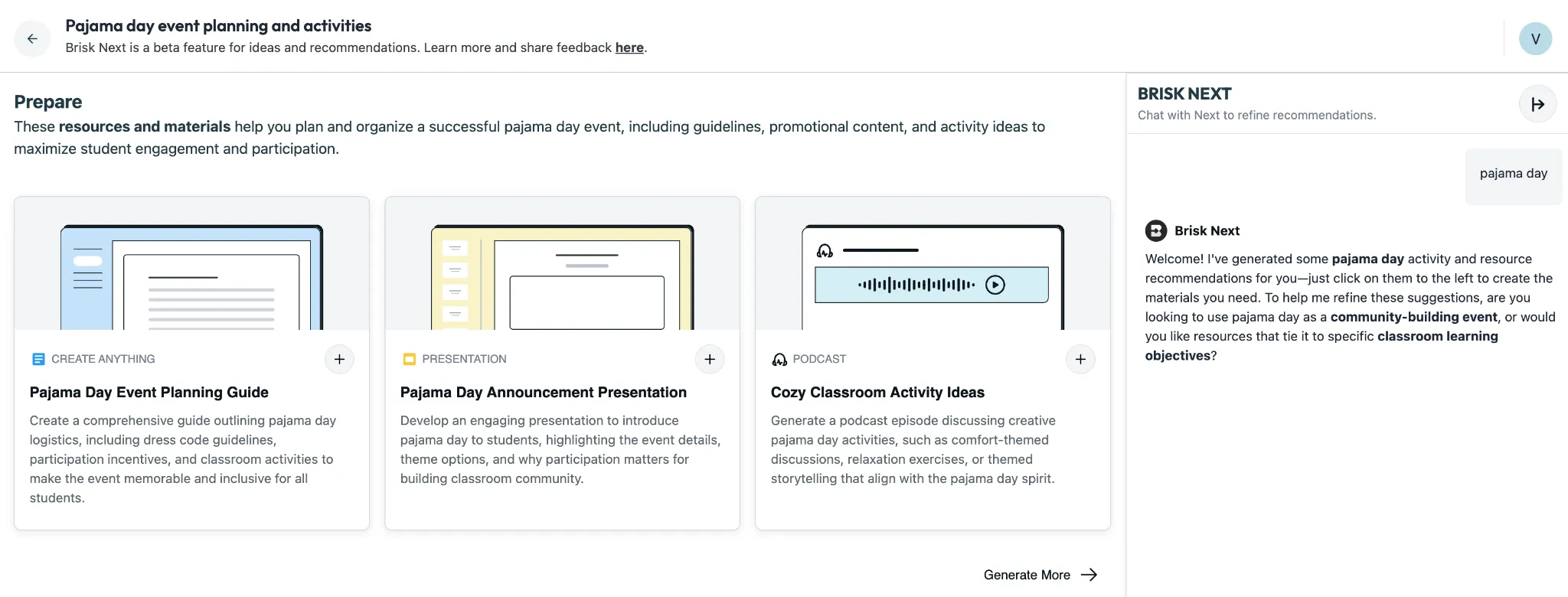
3. It’s Monday of spirit week, and you forgot today was pajama day.
All of your students are wearing pajamas and fuzzy slippers. The room is buzzing with excitement from the novelty of the day, and settling into your original lesson plan feels impossible without a tailored warm-up.
Fix it with Brisk Next:
- Head to app.briskteaching.com.
- Type “Pajama Day” into Next Chat.
- You’ll get resources and materials that will keep students engaged.
- Use the chat in the right-hand sidebar to refine suggestions as desired.
You get an activity that eases students into the lesson and helps align with the festive theme of the day.
4. Your students walk in buzzing about a viral video or trend.
You had a solid plan… and then your students blow through the door dying to talk about a new viral clip or meme. The energy is everywhere, and pretending it’s not happening will only make the lesson harder to start.
Fix it with Brisk Next:
- Pull up an article, short explainer, or other relevant resource about the viral trend.
- Open the Brisk extension.
- Under “Looking for Next Level teaching ideas?”, click the arrow icon to instantly generate activities based on that resource.
- Want to redirect the excitement? Ask Brisk to turn the trend into a structured writing task, a standards-aligned warm-up, or a quick discussion prompt.
Your class still gets to tap into the moment, and you seamlessly steer the energy back into meaningful, academic learning — without losing momentum.
5. You planned a full lesson, but an unexpected assembly ate half your class period.
You walked in ready for a 45-minute lesson. Instead, an unannounced assembly or drill cuts your time down to 12 minutes. You need something that still moves learning forward without rushing.
Fix it with Brisk Next:
- Head to app.briskteaching.com.
- Type “10-minute [topic] warmup” into Next Chat.
- Set your grade level in the dropdown.
- Brisk instantly generates a set of short, standards-aligned activities and resources that fit your remaining class time.
Students stay engaged, you maintain instructional momentum, and your lesson still moves forward — even when the schedule doesn’t go your way.
Brisk Next Is Your Teaching Safety Net
Whether the class energy shifts because of a holiday, a surprise assembly, or a viral moment, Brisk Next helps you stay flexible and student-centered. Recommendations give you immediate ideas, Next Chat helps you adjust them, Bundles keep everything organized, and Assign makes it easy to get materials to students without delay.
The next time a curveball shows up, just open Brisk, tap the Home icon for Brisk Next, and let it help you turn chaos into connection and learning.
Not a Brisk user yet? Get started for free today — thank yourself all year.